Filter Experiment
Under the Filter Experiment tab, choose between a Single Pass or a Multi Pass experiment. For Single Pass, the experiment can be run at a Constant Flow Rate or at a Constant Pressure Drop (often used for membranes). For Multi Pass, choose between the standard test setup or a variant with an initially contaminated test reservoir.
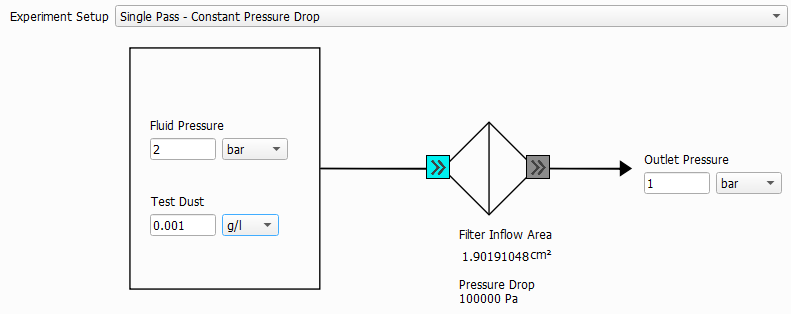
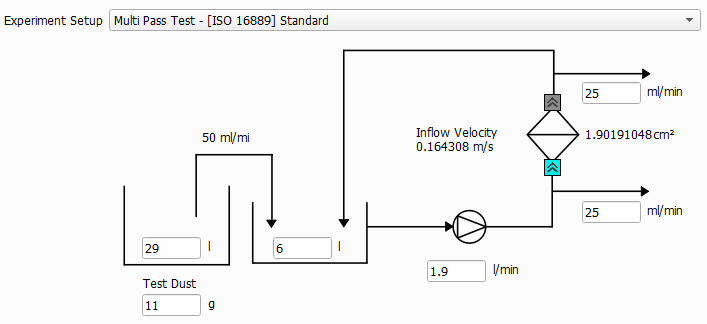
When a method is selected, the setup is shown schematically in the dialog below the pull-down menu. Furthermore, the selected method will influence which options are available elsewhere in the Filter Lifetime dialog.
 Single Pass - Constant Flow Rate

Single Pass - Constant Pressure Drop
Multi Pass Test - [ISO 16889] Standard
Multi Pass Test - Variant

Simulation Stopping Criterion
The simulation continues to run until one of the following criteria is reached:
- If Max. pressure drop increase is selected, the simulation stops if the initial pressure drop is increased by the given value. This option is not available if Single Pass - Constant Pressure Drop was selected.

- If Max. pressure drop is selected, the simulation stops if the given pressure drop is reached. This option is not available if Single Pass - Constant Pressure Drop was selected.

- If Max. flow rate decay is selected, the simulation stops when the flow rate falls below the given percentage (%) of the initial flow rate. This option is only available if Single Pass - Constant Pressure Drop was selected.

- If Max. time reached is selected, the simulation stops when the defined simulation time is reached.

- If Max. total deposited dust is selected, the simulation stops when the defined amount of deposited dust is reached.

- Multi Pass Test simulations always automatically stop when the Injection reservoir is empty.

- The simulation always automatically stops when the Inflow region is filled with particles. This is triggered when the first deposited particle reaches the inflow plane.

Flow Settings
In this command, the Flow Direction is fixed to From Particle Inflow to Outflow.
The Flow Motion can either be creeping or fast flow. In the creeping flow case, the Stokes equations are solved to determine the flow field. If fast flow is chosen, the Navier-Stokes equations are solved to determine the flow field.
As the Stokes equation is a simplification of the Navier-Stokes equation, choosing Fast flow (Navier-Stokes) will give correct results also in the case of slow, creeping flow. Solving the Navier-Stokes equations is computationally more expensive than solving the Stokes equations, so it is advisable to choose Creeping flow (Stokes) whenever justified.
The 3D model of the complete filter typically contains also the filter housing. In this case, flow will only occur inside of the filter housing and the domain Boundary Conditions do not apply. However, if the filter is symmetric, it is possible to reduce the computational cost by modelling only one half or one quarter of the filter. In these cases, the flow area will be open to one or two sides of the domain and one should select Symmetric boundary conditions for the flow at the domain boundary. No-Slip means that the structure is encased in a solid wall at the domain boundary. Particles will be reflected at the boundary in this case.
As Inflow Material one of the fluid material IDs can be selected. After selecting a material ID here, the  symbol changes to the selected color and the Filter Inflow Area is recomputed.
As Outflow Material, one or several material IDs can be selected. After selecting a material ID here, the  symbol changes to the selected colors.
