3D-Image Report
The 3D-Image Report app generates a report from 3D gray value images as a PowerPoint presentation.
To learn more about creating PowerPoint presentations, refer to GeoPy Scripting or check the Python scripts in the scripts folder of this GeoApp (GeoDict installation folder).
|
Modules needed to run this GeoApp: ImportGeo-Vol |

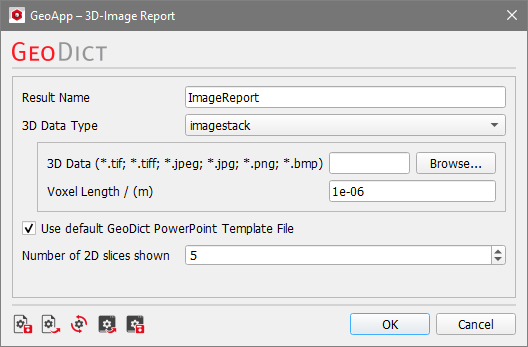
Click Edit to open the 3D-Image Report Parameters dialog.
The input parameters include Result Name, 3D Data Type, Voxel Length, Use default GeoDict PowerPoint Template File, and Number of 2D slices shown.
Please find detailed explanations of the parameters and how to customize the PowerPoint Template File in our GeoApp for 3D-Image PowerPoint reports tutorial. Also, helpful tooltips appear, when hovering the cursor over each parameter.
Browse for the dataset and select the file. For image stacks, select one of the images in the stack folder.
Adjust the parameters as desired. Click OK to close the dialog, go back to the GeoApp section, and click Run to start the generation of the report.
Results
The PowerPoint report is found in the result folder after the GeoApp run is finished.
The presentation contains a title slide and, for each of the Z-, Y-, and X-Directions, the set amount of 2D image slices is included. Three 2D videos can be started by clicking the corresponding slide. The videos show the whole image data from this view axis. A careful examination of the PowerPoint presentation slides, running as a loop, may reveal previously unknown image artifacts.
