MICP for Rocks
The MICP for Rocks app performs a Mercury Intrusion Capillary Pressure (MICP) simulation. The MICP computation sets the simulation settings for a drainage experiment without residual of the replaced fluid from SatuDict to recreate the Mercury Intrusion Porosimetry (MIP) experiment. During the experiment, the structure’s pore space is invaded by mercury from all six sides.
|
Note! This GeoApp will be removed in GeoDict 2026. Instead, use the Mercury Porosimetry & Capillary Pressure command in SatuDict to compute an MICP on rocks. |

|
Modules needed to run this GeoApp: SatuDict |

Click Edit to open the MICP for Rocks Parameters dialog.
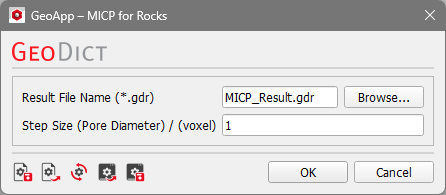
The Result File Name can be changed.
The Step Size (Pore Diameter) in voxel must be selected. This is the same parameter as the parameter in the Capillary Pressure options dialog in the Solver Parameters tab as described in the SatuDict user guide. The capillary pressure is related to the pore diameter as given by the Young-Laplace formula. The algorithm increases or decreases the pore diameter from step to step by the given size.
Results
After the simulation is finished, the Result Viewer opens showing the results from SatuDict drainage simulation as described in the SatuDict user guide.
 #
#The saturation table is shown in the Results – Report tab. The capillary pressure curve, the layered saturation, and the pore throat size distribution can be viewed in the Results – Plots tabs.
