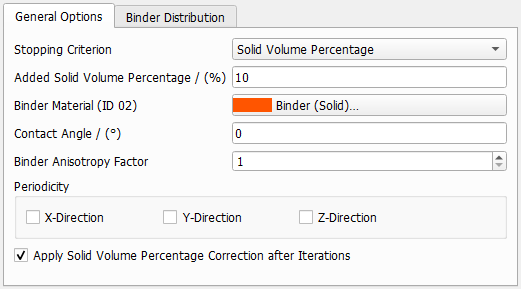
Define the general options, as the amount of binder to be added, the material and stopping criteria.
Stopping Criterion
You may choose the most practical stopping criterion when adding binder. The chosen Stopping Criterion interrupts the addition of binder when it is reached. The possible stopping criteria are Solid Volume Percentage, Weight Percentage, and Grammage.
The weight of binder reaches a certain percentage of the weight of material.
As seen above for the Solid Volume Percentage stopping criterion, the Binder Material is assigned to the next available material ID, and the appropriate Binder Material should be selected from the material database by clicking the button.
It is necessary to set the density for the structure’s material (Material Density) and for the binder material (Binder Density) both in g/cm3, as well as the desired (weight) percentage of binder material to structure material (Binder Weight Percentage, in %). That is, a binder weight percentage of 20 means that there are 20 g of binder added per 100 g of objects in the structure.
In the following example, two types of binder (high density: 5 g/cm3 and low density: 0.5 g/cm3) are added to a structure material with a density of 1.1399 g/cm3. Setting a binder weight percentage of 20% (20 g binder/100 g objects), the amount of binder material deposited is much larger when the binder is less dense.
For Weight Percentage, when Manual or Undefined are selected, you must enter the density of the binder (Binder Density (g/cm3)). If a material is selected from the database, the Binder Density of the binder material is automatically entered. If a manual material is used frequently, it is useful to save it to the material database.
The addition of binder stops when the Added Grammage (material and binder, g/m2) is reached.
As seen above for the Solid Volume Percentage stopping criterion, the Binder Material is assigned to the next available material ID and the appropriate material to be used as binder should be selected from the material database by clicking the button.
For grammage, when manual or undefined are selected, the density of the binder is not automatically taken from the database and you must enter it manually (binder density (g/cm3)). If a manual material is used frequently, it is useful to save it to the material database.
Binder Material
The Binder Material is assigned to the next available material ID, and the appropriate material to be used as binder should be selected from the material database by clicking the button.
Contact Angle
The Contact Angle defines the angle in which the binder is deposited in relation to the materials in the structure. Values between 0° and 60° are accepted. The contact angle helps to optimize and realistically model the addition of binder.
The contact angle must fulfill the following requirement:
(19) Contact Angle Requirement
where is the contact angle and Diameter(Pore) means the maximal dilation radius. If this requirement is not met, a warning message appears. It is recommended to inspect the resulting structure to detect artifacts.
Observe the effect of adding binder with a Contact Angle of 0° or 45°.
Binder Anisotropy Factor
The Binder Anisotropy Factor allows to control the grade of binder anisotropy in the X-Y-plane. If the factor is the default value of 1, the binder is distributed isotropically. By choosing larger values, the binder is distributed in the XY-plane but then, the contact angle value is not accurate anymore.
Observe the effect of changing the Binder Anisotropy Factor from (the default) 1 to 3 when adding binder. With a binder anisotropy factor of 3, the binder is added in the direction of the XY-plane.
Periodicity
When the 3D-structure model is periodic in one or more directions, the binder can be added periodically: in all directions, only in the selected direction (Periodic X, Periodic Y and/or Periodic Z), or non-periodically. Adding binder periodically in certain direction(s) only makes sense if the 3D-structure model is periodic in that/those direction(s).
The algorithm adds binder until the iteration stops according to the given stopping criterion. Thus, the given value for Solid Volume Percentage / Weight Percentage / Grammage is usually not reached precisely and there are few cases, where the algorithm even does not converge.
If the amount of binder should be reached perfectly, it can be corrected by checking Apply Solid Volume Percentage Correction after Iterations, Apply Weight Percentage Correction after Iterations or Apply Grammage Correction after Iterations depending on the chosen stopping criterion.
Selecting this option adds or removes binder surface voxels after the iterations are stopped until the given binder value is reached precisely.
Important! Using the correction feature reduces the Contact Angle precision.
If the realized amount of binder after the iterations is larger than the target value, voxels are removed from exposed positions, i.e. voxels with only one contact to another binder voxel.
In the other case, if the amount of binder is smaller than the target value, the algorithm adds voxels on positions with the most binder voxel neighbors.


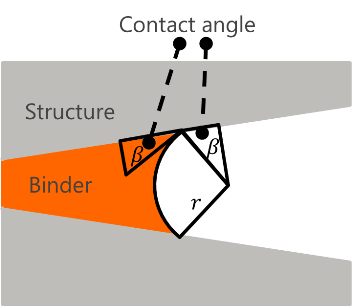
 Requirements for large contact angles


