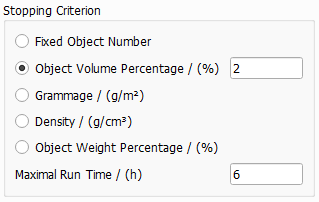
Stopping Criterion
The parameters in the Stopping Criterion panel define after which criteria the object generation should be stopped. The available parameters are Fixed Object Number, Solid Volume Percentage (%), Grammage (g/m2), Density (g/cm3) or Object Weight Percentage (%). Additionally, when the Maximal Run Time (h) is expired, the process is stopped even when the desired stopping criterion cannot be achieved.
When Grammage, Density or Object Weight Percentage are chosen as stopping criterion, the temperature must be set as additional parameter. The density of the constituent materials will be set with respect to the chosen temperature based on the Material Database.
When choosing Fixed Object Number or Solid Volume Percentage, the temperature parameter is not available.
 Fixed Object Number
When Fixed Object Number is chosen as stopping criterion, GrainGeo places the given number of objects in the structure and then the generation stops.
Observe the effect of setting a fixed number of objects (10, 100, or 200) as stopping criterion, for the generation of a structure with two types of spheres. All other parameters are left untouched.
|
Object Solid Volume Percentage
Object Solid Volume Percentage (SVP) determines the fraction of the total volume in percent that the structure should have. Accepted values range from 0 to 100%. For example, a structure with an Object Solid Volume Percentage of 40 consists of 40% spheres and 60% void space. Porosity is defined as (1 – SVP/100). Observe the difference in a structure when varying the solid volume percentage from 5%, to 20% and finally to 40%, while all other parameters are left unchanged.
|
Grammage
The Grammage (g/m2) determines the mass per unit area (in the XY-Plane) of the resulting structure. When Grammage is chosen as stopping criterion, the density (g/cm3) of the object material(s) must be defined for each object type and chosen material in the object panels under the Object Options tab and the temperature must be set in the Create Options dialog, below the Stopping Criterion panel.
Observe the effect of increasing the Grammage from 60 g/m2 to 120 g/m2, whereas all other parameters are left unchanged.
|
Density
The Density (g/cm3) of the resulting structure depends on the densities of the constituent materials. In the following simple example, the Matrix Density is 0 (for vacuum), and the two grain types have the densities 3.1 g/cm3 and 1.0 g/cm3. The Density of the structure is set to 0.10 g/cm3 and to 0.25 g/cm3. It cannot be set smaller than the lowest occurring density (here 0 g/cm3) or larger than the highest occurring density (here 3.1 g/cm3).
|
Object Weight Percentage
The Object Weight Percentage determines the weight of the created object in relation to the weight of the whole structure (including the matrix material). The calculation is only possible when the density of the Pore / Matrix Material is greater than zero. Otherwise, an error message will appear.
|
Maximal Run Time
The Maximal Run Time (h) becomes important when generating complex structures with elevated solid volume fraction. When Prohibit Objects Overlap has been checked, the required number of objects in the structure may become unattainable. In that case, the structure generation is stopped after the time entered in Maximal Run Time has passed and the achieved structure is considered as the result. The analysis of the GDR result file shows any disparity between the achieved result values and the desired ones.
|
How to know if the stopping criterion is achieved?
The relationship of the variables Fixed Object Number, Object Solid Volume Percentage, Grammage and Weight Percentage can be observed in the Result Viewer of the result file, under the Results - Report subtab.
In this example, a Count (Fixed Object Number) of 50 corresponds to a Volume (Object SVP) of 6.05%, and a Grammage of 9.08 g/m2.
|