Stopping Criterion
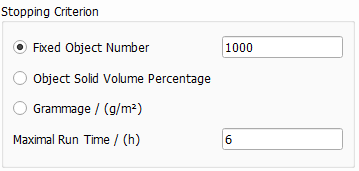
The parameters in the Stopping Criterion panel control when the generation process is stopped, and the material is “ready”.
The available parameters are Fixed Object Number, Object Solid Volume Percentage, or Grammage (g/m2).
Additionally, when the Maximal Run Time (h) has passed, the process is stopped even when the desired stopping criterion is not achieved.
 Fixed Object Number
When Fixed Object Number is chosen as stopping criterion, PaperGeo places the given number of fibers in the structure and then the generation stops.
Observe the effect of setting a fixed number of objects (20, 100, or 500) as stopping criterion, for the generation of a paper structure with two fiber types. All other parameters are left untouched, including the default Allow Fiber Overlap. Note how the overlapping of fibers, shown in orange, increases with the number of objects present in the structure.
|
Object Solid Volume Percentage
The Object Solid Volume Percentage (SVP) determines the fraction of the total volume that the paper structure should have. Accepted values range from 0 to 100 %. For example, a structure with an Object Solid Volume Percentage of 40 consists of 40% fibers and 60% void space. Porosity is defined as (1 – SVP/100).
Observe the difference in a structure when varying the solid volume percentage from 5%, to 20% and finally to 40%, while all other parameters are left unchanged. Note that the Sheet Thickness has not changed, so that the increase in SVP has the effect of producing a denser cellulose sheet.
|
Grammage
The Grammage (g/m2) determines the weight of the resulting paper/cellulose structure.
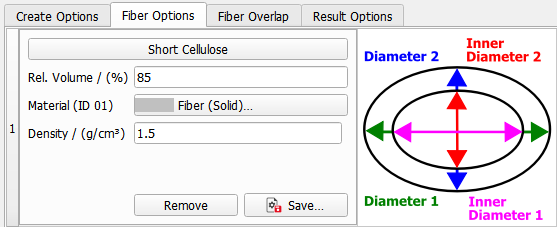
When Grammage is checked as stopping criterion (under the Create Options tab), the Density (g/cm3) of the fiber material(s) can be seen in the materials panels under the Fiber Options tab or must be entered if Manual instead of a Database Material (such as cellulose) is chosen.
Observe the effect of increasing the Grammage from 15 to 40 g/m2, whereas all other parameters are left unchanged.
|
Maximal Run Time
The Maximal Run Time (h) becomes important when generating complex structures, for example with Prohibit Fiber Overlap or Use Isolation Distance and an elevated solid volume percentage. In those cases, the required number of fibers in the structure may become unattainable.
The paper structure generation is stopped after the time entered in Maximal Run Time has passed and the achieved structure is considered as the result. The analysis of the GDR result file shows the disparity between the achieved result values and the desired ones.
|
How to know if the stopping criterion is achieved?
The relationship of the variables Fixed Object Number, Object Solid Volume Percentage, Grammage and Weight Percentage can be observed in the Result Viewer of the result file, under the Results - Report subtab.
In this example, a Count (Fixed Object Number) of 50 corresponds to a Volume (Object SVP) of 6.05%, and a Grammage of 9.08 g/m2.
|