Pore-Fragment Reconnection
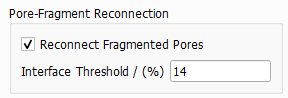
In some cases (e.g. for complex pore shapes), the watershed algorithm in step 1 tends to over-segment the pore space. This means, that sometimes pores are identified as multiple pores (Fragmented Pores) when, in fact, they may be a single pore with a complex shape. Activate the checkbox Reconnect Fragmented Pores to merge connected pores depending on the value chosen for Interface Threshold.
The probability that two grain fragments belong to the same grain is measured with the interface ratio. This interface ratio compares the interface area of two touching grain fragments with the surface area of the grain fragment with the smaller surface.
For the computation of the interface ratio, the pore surfaces and interfaces need to be computed. The surface area estimation is based on Estimate Surface Area from MatDict (see also J. Ohser, F. Mücklich).
If the interface ratio is larger than the percentage chosen for the Interface Threshold, the two pore fragments are merged and only one pore is reported as identified.
For example, if the Interface Threshold is set to the default 14, the shared interface of two pores must be larger than 14% of the total surface of the smaller pore for the two pores to be merged. The next example shows two structures in which a big pore and a small pore touch with different interface surface between them. Depending on the surface of the interface, the value of Interface Threshold at which the two pores stop being reconnected and are detected as two (instead of only one) is very different.
When the two pores share a small interface, a low value of Interface Threshold (7) is enough to separate the two pores. When the two pores instead share a large interface, a higher value of Interface Threshold (15) is needed to separate the two pores. The default value of Interface Threshold (14) would be appropriate to separate the two pores sharing a small interface, but not the pores sharing a large interface.
The value for the Interface Threshold must be chosen carefully depending on the size of pores in the structure. With a low threshold, more pores are merged (and less pores are identified).
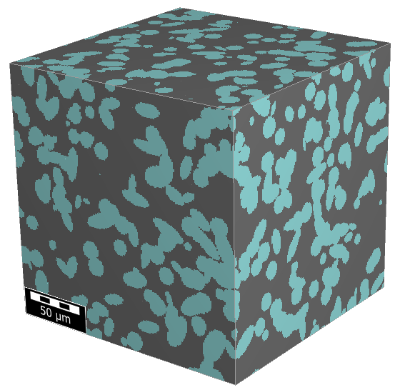
In the figures below (using the visualization of *.g32 files), observe the effect of different choices for the Interface Threshold. For this example, the Minimal Pore Diameter is always 2 µm. With a very low Interface Threshold value of 3%, several large and complex pores are identified in the structure that may not correspond to single pores. With a value of 20%, the pore space may be over-segmented with many small pores being detected.
|
Know how! Use the Reconnection Indicators histogram under the Results → Plots subtab in the Result Viewer to find an appropriate Interface Threshold for the structure. As described above, the ratio of the interface area between two pores and the total surface of the smaller pore is computed. This ratio of all pore interfaces and the selected Interface Threshold are plotted in the Reconnection Indicator histogram. The following ratio histogram belongs to the example structure and the interface threshold of 20% is marked in blue. Observe that many pore interfaces have a ratio smaller than 20%, thus only few pores are merged together. 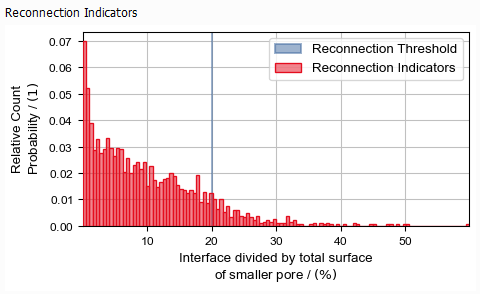 |

