In Pore Size Distribution (Porosimetry) measurements like Mercury Intrusion Porosimetry (MIP) or Liquid Extrusion Porosimetry (LEP) the pore sizes of a media are measured by pressing a non-wetting liquid or gas into the medium and registering applied pressure and absorbed volume. The pressure applied is related to the radius of the pores accessible to the non-wetting liquid, which gives a size distribution of the pores. Closed pores do not contribute to the pore volume at all, while other pores only contribute to the pore volume fraction if they are connected to the non-wetting phase reservoir (e.g. the mercury reservoir). Find more details about the theory behind the Porosimetry in the Theoretical Basics section.
The parameters of Porosimetry are similar to those of Pore Size Distribution (Granulometry), but fewer large pores are found by Porosimetry than by Granulometry. The reason for this is that a big pore in the interior of the volume must be reached from the intrusion sides, usually through a small diameter pore-throat. The big pore is counted as pore volume of a certain diameter only if a sphere with this diameter can be pushed from the intrusion side through the pore-throat to reach the big pore. In other words, porosimetry provides a measure of the pore-throat distribution.
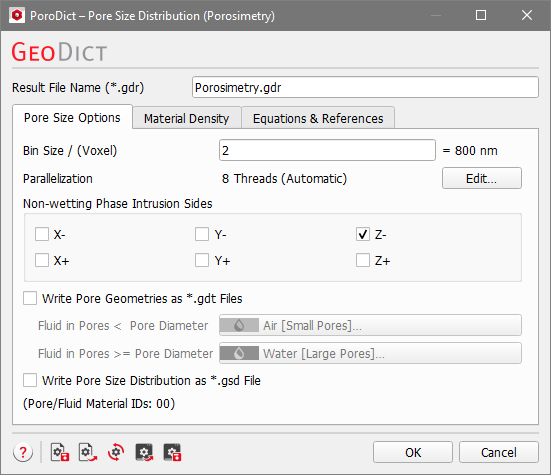
The Pore Size Distribution (Porosimetry) dialog opens when clicking the Edit… button and includes the Pore Size Options, the Material Density and the Equations & References tab, which cites several references.
At the top of the dialog, enter the Result File Name. The result file is saved in the chosen project folder (File → Choose Project Folder in the menu bar).
Enter the Bin Size in units of voxels. The equivalent in metric length units is shown on the right. The bin size determines the range of diameters that belong to one class of pore sizes.
All bins have equal bin size. Beginning with the largest possible diameter that is divisible by the bin size the diameter is reduced by the bin size in each step. Every voxel is then assigned the diameter of the largest possible sphere that can be fitted in the pore and contains this voxel. Thus, each bin contains pore voxels with an assigned diameter in the range comprised between and , where is the bin number.
For example, when analyzing a porous structure with a voxel size of 1 µm, you can set the bin size to 2 or to 4 (voxels) which would come to classify the pores by their diameter in ranges of 2 µm or 4 µm, and would result in the following bins:
Bin number ()
Pore diameter between
Bin Size 2 µm
Bin Size 4 µm
1
0 µm - 2 µm
0 µm - 4 µm
2
2 µm - 4 µm
4 µm - 8 µm
3
4 µm - 6 µm
8 µm - 12 µm
..
...
...
When choosing the bin size, be aware that the underlying algorithm to compute the Euclidean distance operates directly on the voxel grid. Thus, the smallest possible distance between two grid points is 1 voxel, which corresponds to a pore radius of 1 voxel. This means the smallest pore diameter that the algorithm will find is 2 voxels. In general, the error made when computing the pore size distribution is of the same order of magnitude as the discretization error of the structure, i.e. 1 voxel.
In the result viewer, for each bin the Minimal Diameter, which is the diameter of the smaller sphere, and the Maximal Diameter, which is the diameter of the larger sphere, are given. This means all pore voxels in that bin have a diameter that is larger or equal than the minimal diameter and smaller than the maximal diameter.
Control how many threads are used for the computation. Parallelization is possible if your license and hardware allow it. The Parallelization Options dialog opens when clicking the Edit button, to choose between Sequential, Parallel (Shared Memory) or Automatic Number of Threads.
Selecting Sequential will not apply parallelization.
When Parallel (Shared Memory) is selected, the Number of Threads can be entered. Below, the maximum number of available threads and the maximum number of licensed parallel processes is shown in the dialog.
If Automatic Number of Threads is selected, the number of parallel processes is automatically selected for optimal speed, based on the CPU cores and licensed parallel processes.
For up to eight Available Threads, all of them will be used. If more than eight threads are available, two cases might occur.
The number of Available Threads is larger (or equal) than the Number of CPU Cores:
Then the maximum of eight and Number of CPU Cores divided by 2 is used.
The number of Available Threads is smaller than the Number of CPU Cores:
Then the maximum of eight and number of Available Threads divided by 2 is used.
When Write Pore Geometries as *.gdt Files is checked, files in *.gdt format are saved in the automatically created results folder (e.g. .../Granulometry/...) inside the project folder (see Pore Size Visualization). The amount of these *.gdt files reflects the number of pore size steps and depends on the entered Bin Size. A large bin size results in fewer size steps, and thus, fewer *.gdt files are saved for the visualization. For each bin, a separate *.gdt file is written, where every voxel of the pore space is assigned to one of the specified materials.
In the *.gdt file of a certain bin a voxel is assigned to the first material if it belongs to a lower bin number, i.e. the corresponding pore diameter is smaller. Consequently, all voxels from a bin with the same or higher number are assigned to the second material. This results in two different Material IDs for the voxels in the pore space. The materials written into these *.gdt files can be specified after checking Write Pore Geometries as *.gdt Files. Forexample, predefined materials of the Material Database, such as Air or Water can be chosen by clicking on the buttons. The current Material IDs for the fluids in the pores are shown at the bottom.
Additionally, when Write Pore Size Distribution as *.gsd File is checked, a file with the default name PoreSizeDistribution.gsd, in *.gsd (GeoDict Size Distribution) format, is saved in the results folder inside the project folder. The file contains the pore size (diameter of sphere) of each voxel written into a volume field that can be loaded from the Pore Size Visualization tab of the Result Viewer.
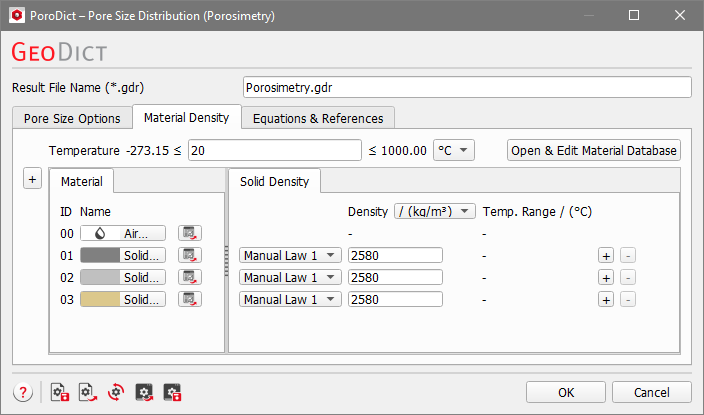
Material Density
Under the Material Density tab, the temperature can be edited if the density of a material is temperature dependent. Additionally, the density of every solid material in the structure must be specified in this tab. The density can be given in kg/m3 or g/cm3. For materials from the GeoDict Material Database, the density value is entered automatically. If a material is set to Manual, the Material Law changes to Manual Law and more laws can be added or deleted by clicking the “+” or “-“ button on the right of the corresponding row. You can enter the density for manual materials directly in the Solid Density tab.
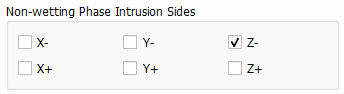
 Non-wetting Phase Intrusion Sides