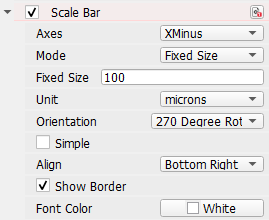
In 3D mode, the Scale Bar can be placed on the structure according to the three Axes (X, Y and Z). Minus then places the scale bar on the origin side of the specified axis and Plus on the opposite side.
Rotate the scale bar as desired, by changing the Orientation.
The scale bar can be Aligned in the Bottom Left, Bottom Right, Top Left or Top Right of the specified structure side.
In the following example, the scale bar position is set to default, i.e. the Plus side of the Z-axis at the Bottom Left, with a 0 Degree Rotation.
Other positions may be better if the structure is rotated differently. In the following figure, the Minus side of the Y-axis is turned to the front. Thus, selecting YMinus for Axes lets appear the scale bar in the front again. But without changing the Orientation, it is displayed upside down in the upper right corner of the YMinus side.
Changing the Orientation to 180 Degree Rotation turns the scalebar about 180 degrees. Additionally, selecting Top Right moves the scale bar to the top right from the structures perspective, in this case resulting in a bottom left position from the viewer’s perspective.
Setting the Axes to Auto always places the legend on the front of the structure in the correct orientation.
The other available options for Scale Bar are described for the 2D mode.
|