Results
Click OK to input the entered parameters, and then click Run in the DiffuDict section to start the Knudsen Diffusion command. The results are immediately shown in the opening Result Viewer after the process is finished, the screenshots below show the results obtained for the MPL model (Example 3):
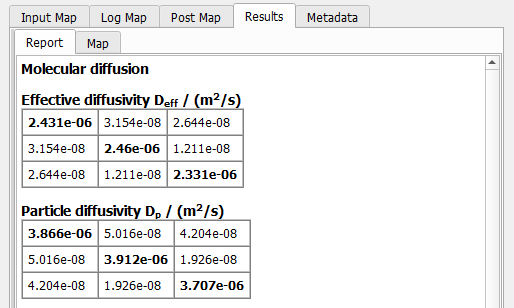
In the Results - Report subtab, the following results are reported
- The Effective diffusivity obtained by multiplying the diffusivity of the particles with the porosity.
- The Particles diffusivity computed by equation (201) using the user defined mean thermal velocity.
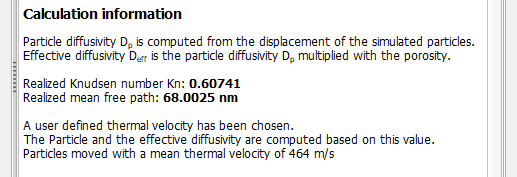
Some calculation information on how to compute the particle diffusivity and effective diffusivity is given as well as
- The Realized Knudsen number determined as quotient of the realized mean free path and the computed characteristic length.
- The Realized mean free path is computed by dividing the travel distance with the number of molecule-molecule hits. It shows the mean free path realized by the drawn random distribution of free path lengths.
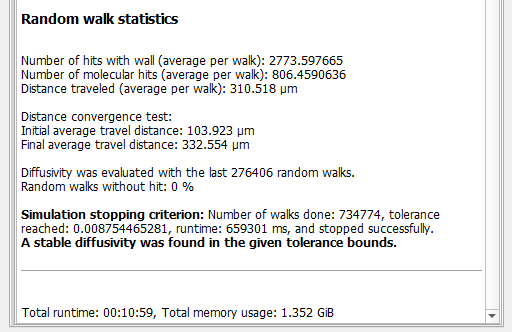
Then, some statistical information about the performed random-walk method is given:
- The average number of collisions with a pore wall a random walker experienced during the simulated time.
- The average number of collisions with another molecule a random walker experienced during the simulation time.
- The average distance that a random walker traveled.
- If Auto Distance, Check Convergence was chosen, the initial and final average travel distance used to check the convergence for .
- The number of random walks evaluated to achieve the requested tolerance.
- As a check for plausibility of the results: the percentage of random walkers that have not collided with any pore wall during the whole simulation time. If this value is not equal to 0 %, consider increasing the Average Travel Distance!
- The criterion that caused the simulation to finish.
- The total runtime and memory usage for this simulation.
The random walk algorithm is done using the Mean Thermal Velocity entered in the Constituent Materials input dialog. However, the results can be rescaled to any given mean thermal velocity by entering another Thermal Velocity and clicking on the Apply button.

