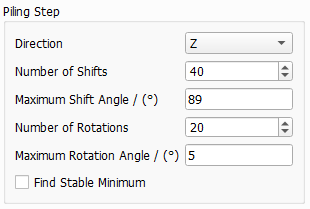
Piling Step
The object movements during the piling steps are mainly defined by the falling Direction and by the automatic finding of the stable minimum (Find Stable Minimum).
When the result is unsatisfactory, additional parameters can be used to refine it (Number of Shifts, Maximum Shift Angle, Number of Rotations per shift and Maximum Rotation Angle.
The option to find the stable minimum is not available when all objects fall at the same time (Pile Mode → All Objects at Once).
 Direction
The Direction in which the piling process happens can be chosen from the pull-down menu. For all three axes, the objects fall towards the positive direction (X+, Y+, or Z+). Observe the piling of objects with On Inflow Plane Center as initial object position, falling from all three directions.
|
Number of Shifts, Maximum Shift Angle, Number of Rotations, Maximum Rotation Angle
Throughout the piling process, the objects fall and roll to their final location in the structure. After the fall, i.e. after hitting an obstacle as the bottom domain boundary or another object, the objects shift and rotate as many times as defined by the values for Number of Shifts and Number of Rotations before they come to rest at the bottom of the structure. Low values for shifts and rotations produce structures with objects that settle earlier compared to larger values of these parameters, resulting in a lower packing density.
In detail, the algorithm for each shift tries the given number of rotations. If a better position is found for the object, lower in the specified direction and without overlapping with other objects, it is used as a new point for the object. Then, the numbers of shift and rotation are reset. The algorithm terminates if no new position is found for the given number of shifts and rotations.
The Maximum Rotation Angle describes the maximum angle the objects can rotate from step to step. The object is rotated around the center defined for the object, which in most cases is the center of mass.
The Maximum Shift Angle restricts the angle that the objects can shift with respect to the piling direction. The maximum shift angle must be smaller than 90°.
Observe the effect of setting a low or a high Number of Shifts value on the final position of objects in the otherwise same structure.
|
Find Stable Minimum
When checking Find Stable Minimum, each object is checked to have a stable state with respect to gravity at the end of the piling process.
further downwards, it is checked if it is possible to move it in the plane perpendicular to the specified direction without obtaining overlap with other objects to find a new position where the potential energy can be further reduced. If not, it has the lowest position possible and is considered as stable.
Observe the effect of checking or unchecking Find Stable Minimum in the piling 100 objects with initial object position On Inflow Plane Center.
While it is faster to pile structures when Find Stable Minimum is unchecked, the resulting packing densities are lower.
Observe the realized Volume / (%) value (shown in the result file under the Results tab) when Find Stable Minimum is checked or unchecked. The piled structures of objects with initial object position On Inflow Plane, and Fill To Rim as stopping criterion, look fairly similar but the realized volume percentages are rather different.
|
Maximum Check Length
The Maximum Check Length is a further refinement when finding the stable minimum. For every object, the algorithm checks for an even more stable position around the already reached minimum with a radius defined by the voxel value entered in the field. A higher value increases the stability of the pile.
|