|
Navigation: GeoDict 2025 - User Guide > Material Modeling > FoamGeo > Kelvin Structure |
Scroll |
Foam Options
In the Foam Options tab the materials of the foam components and the options for the struts can be entered. Here, one can also select to model an open-cell foam or a closed-cell foam. If a closed-cell foam is modelled, options for the faces become available.
The pull-down menu of Material ID Mode has two options: Material ID per Object-Type and Material ID per Material. For Material ID per Object-Type, different IDs are assigned to the fluid material in the pore space and the solid materials of the struts and faces. The materials for Pore Fluid (ID 00), for the Strut Material (ID 01) and, below, the Face Material (ID 02) can be selected from the Material Selector by clicking the buttons consecutively. 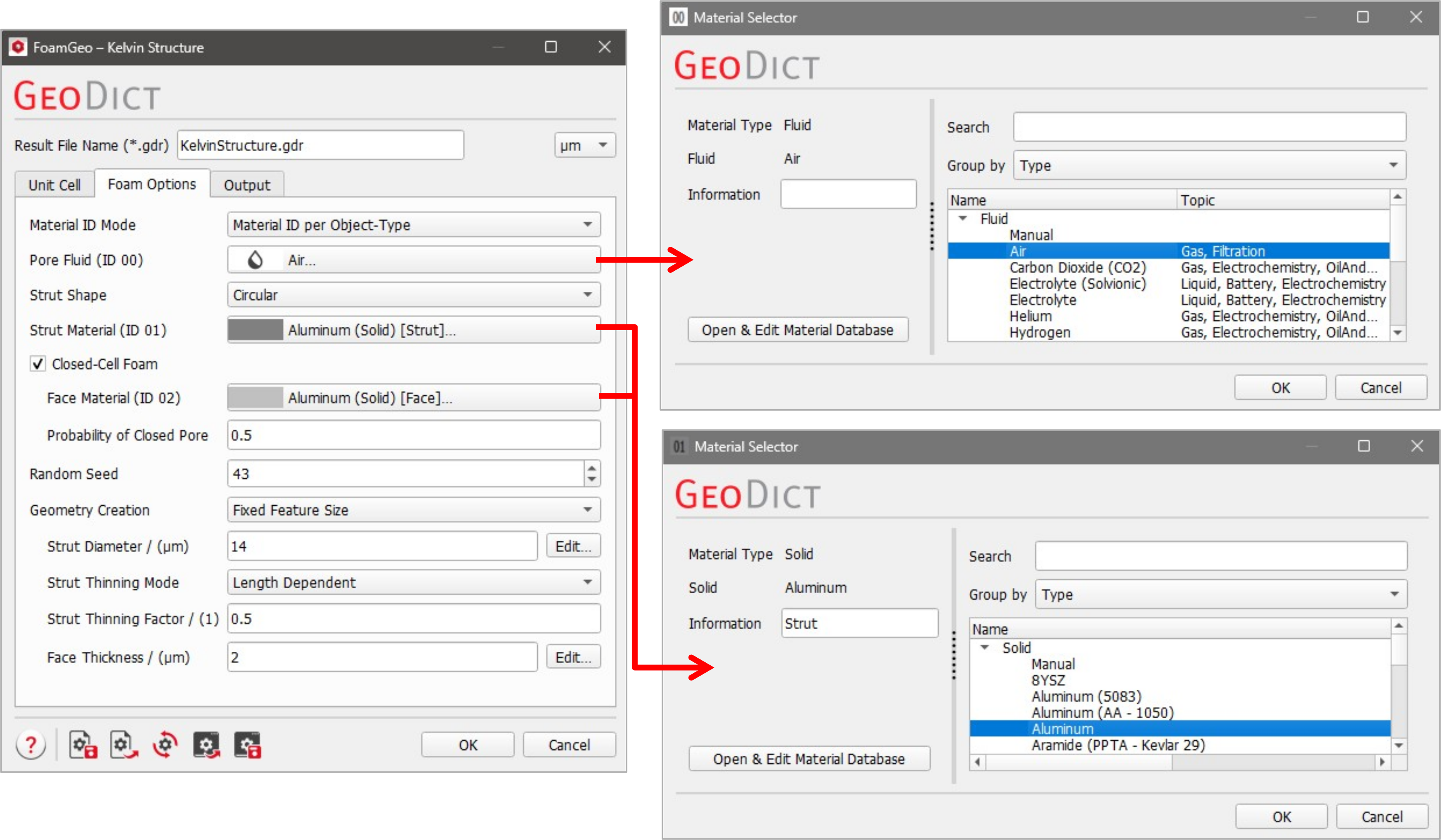 For Material ID per Material, Strut Material and Face Material are assigned to the same Material ID (ID 01), if the same material is chosen. By default, the materials have the additional information Strut or Face. This has to be deleted in order to have the same material for both components. To do so, click on the material name and clear the Information field in the Material Selector. 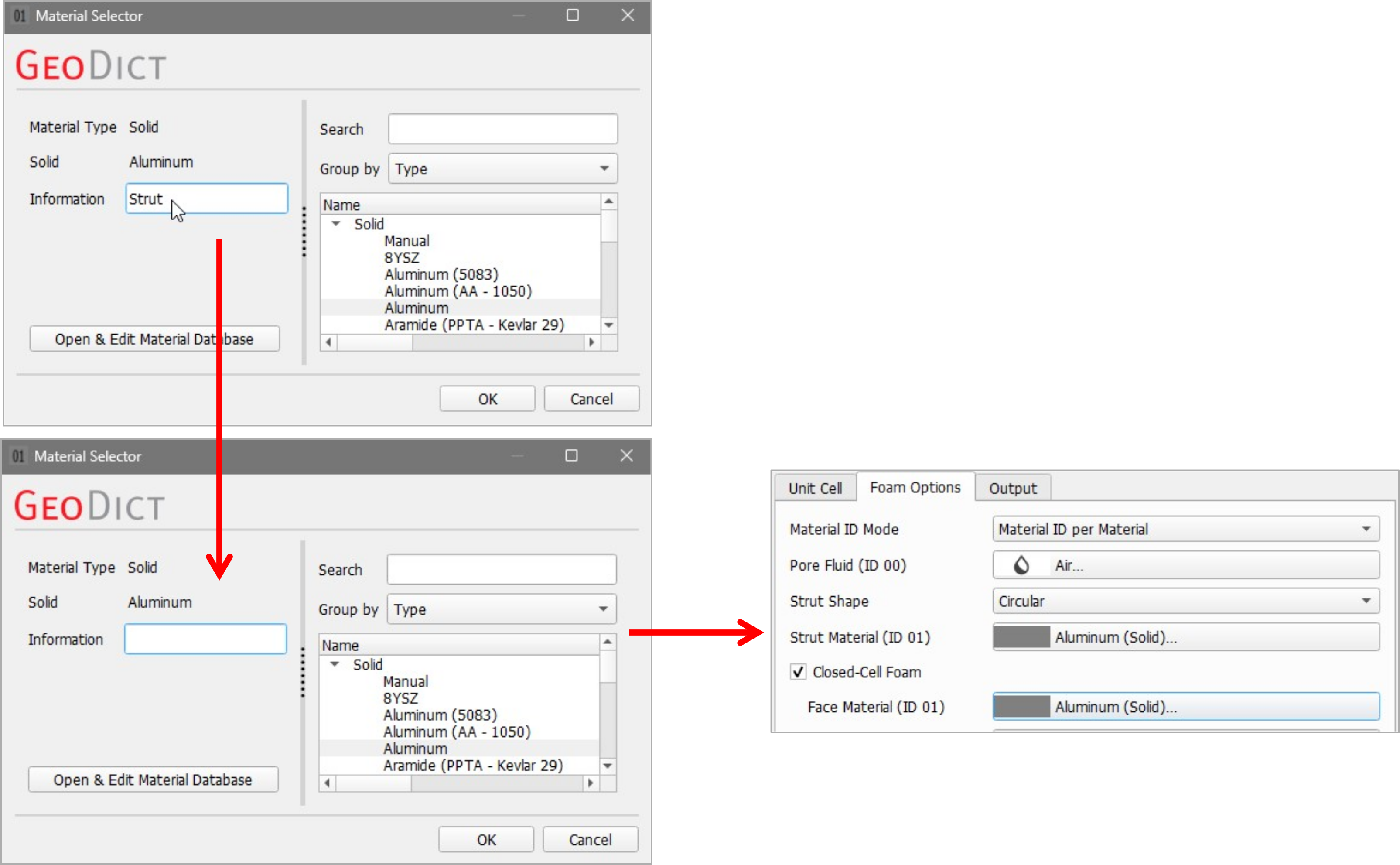 |
The shape of the foam cell strut can be selected in the Strut Shape pull-down menu. The strut shape can be Circular, Hollow or Angular. 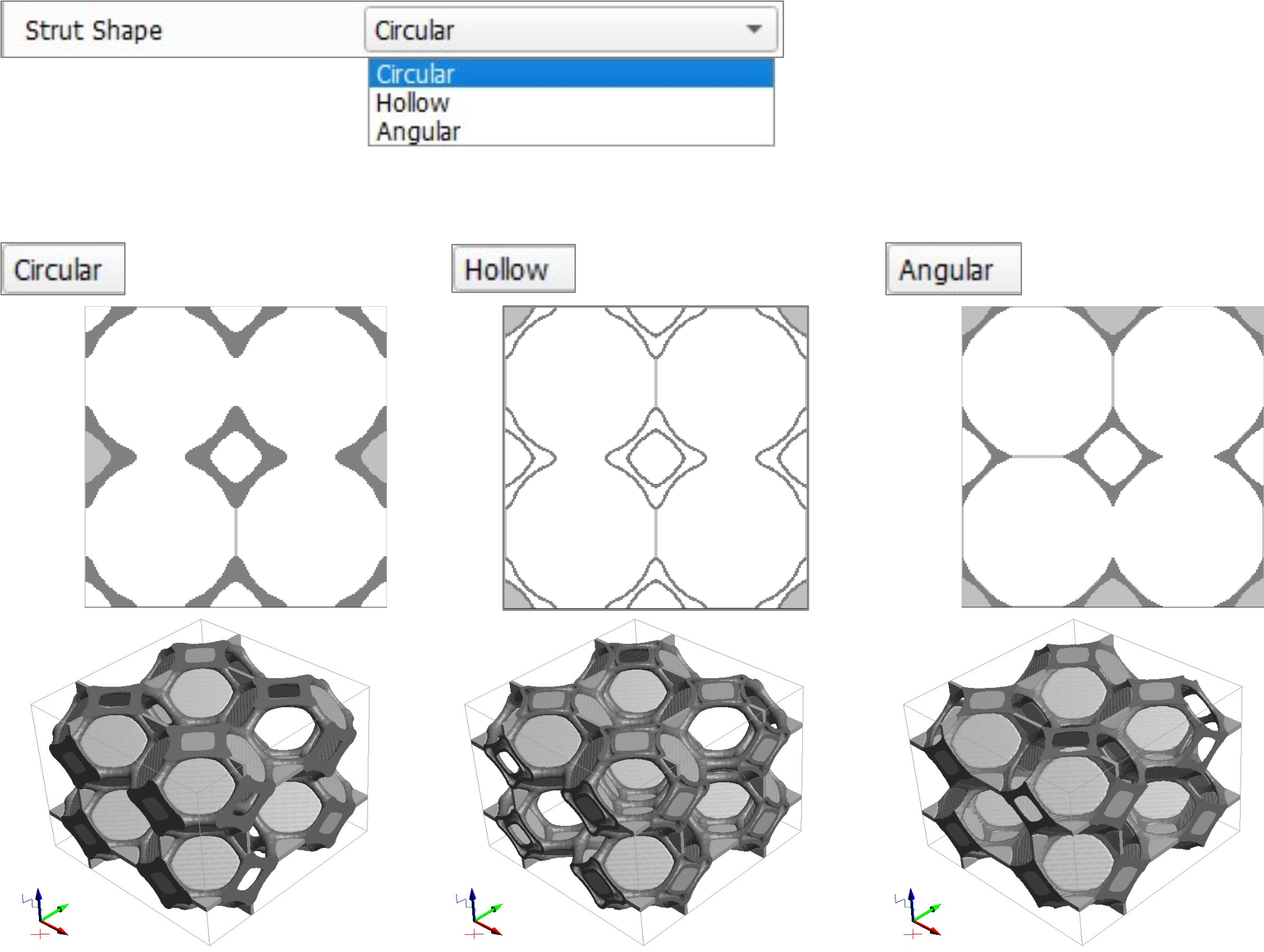 |
If Closed-Cell Foam is checked, cells with faces are generated. The Probability of Closed Pore determines how many cells are closed. Unchecking Closed-Cell Foam generates a sponge or open-cell foam, with the struts forming a polygon without faces in between. 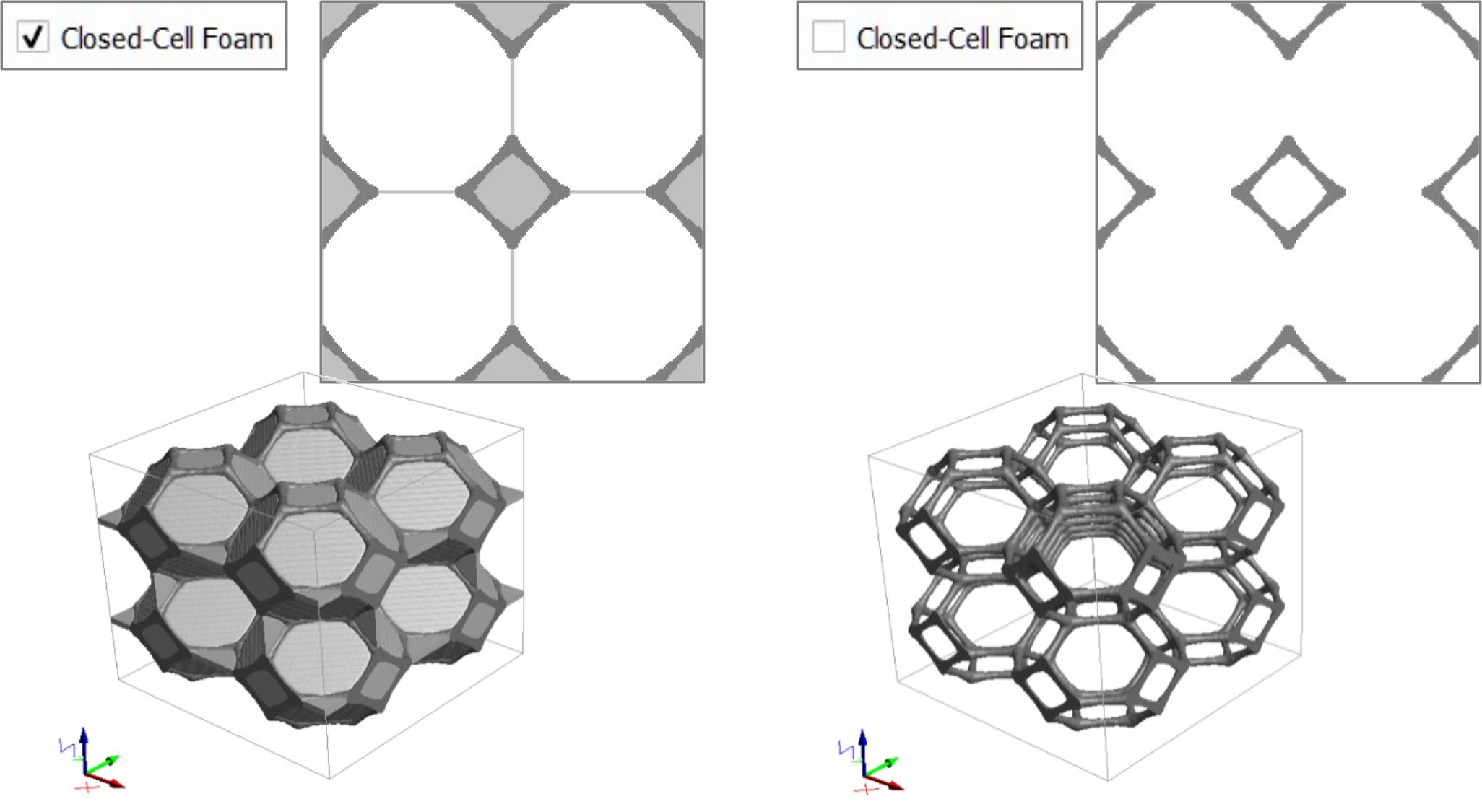 When the structure is a closed-cell foam, values between 0 and 1 can be entered for the Probability of Closed Pore. When the value is 1, all pore walls are closed. When the value is 0, the result is an open foam. 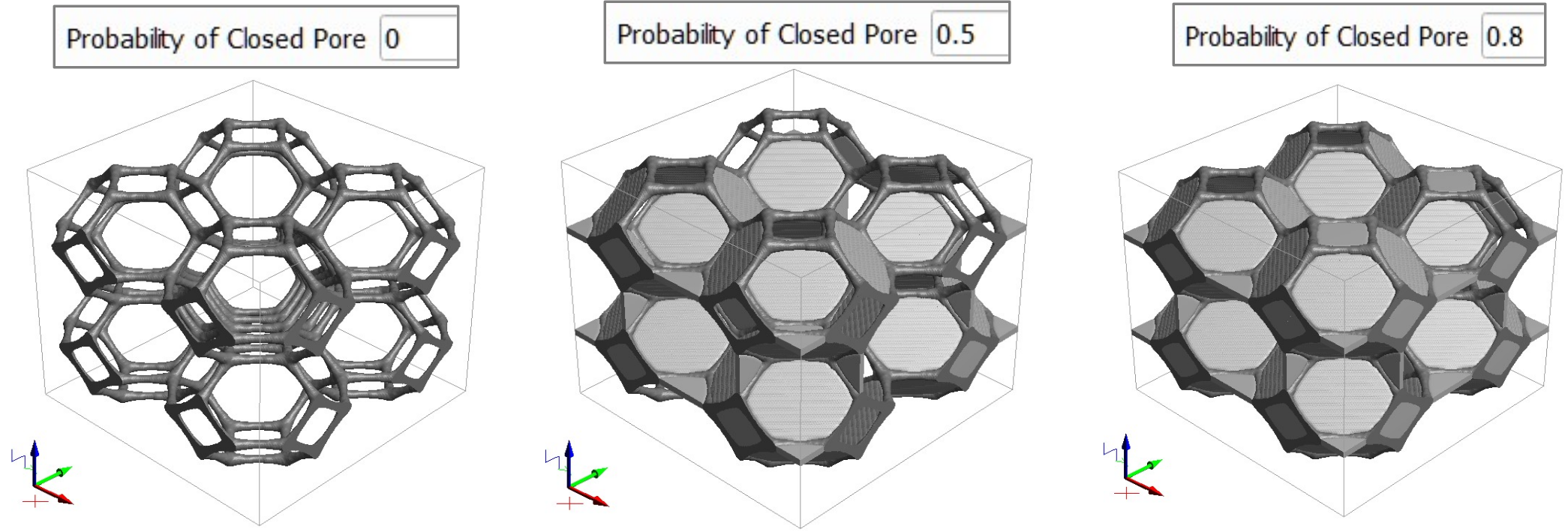 When Closed-Cell Foam is unchecked, the structure has no faces and thus, the Face Material, the Probability of Closed Pore and the Face Thickness cannot be chosen. |
Random Seed initializes the random number generator behind the structure generator. Changing its value produces different sequences of random numbers and hence, different realizations of the specified structure. If all settings are equal, generating with the same Random Seed value produces exactly the same structure. Random Seed is a positive integer number. Varying the Random Seed allows generating different samples of the same foam structure. |
The chosen Geometry Creation mode defines the parameters of the structure, that can be selected. Fixed Feature Size or Fixed Solid Volume Percentage are available as Geometry Creation modes. Select Fixed Feature Size to create a foam with a fixed size distribution for the strut diameters, the face thickness and, if Hollow as Strut Shape is selected, the thickness of the strut walls. 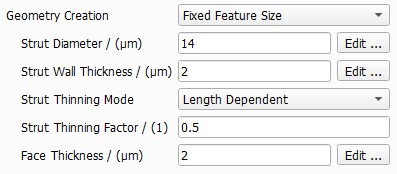 The Strut Diameter distribution, Strut Wall Thickness distribution and Face Thickness distribution can be entered by clicking the Edit… buttons in this mode. Details are explained below. For both modes, the thinning of struts is defined by the Strut Thinning Mode and the Strut Thinning Factor. The Strut Thinning Factor determines the rate by which the diameter of the strut diminishes towards the center of each strut. The Strut Thinning Mode defines if this thinning depends on the length of the strut or is independent of the length and thus fixed. More details can be found in the section Strut Thinning. With the Geometry Creation mode Fixed Solid Volume Percentage, the Solid Volume Percentage of the structure created, as well as the Struts/Faces SVP Ratio are defined instead. The Strut Wall Thickness is only available for the Strut Shape Hollow and can be defined in the same way as before. 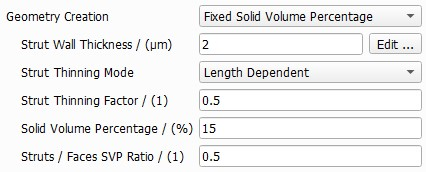 |
 Strut Diameter, Face Thickness and Strut Wall Thickness Distribution
Clicking on the Edit… button for the Strut Diameter, the Face Thickness and the Strut Wall Thickness offers several options. Every parameter can be set to a Constant value, or to follow a distribution (Uniformly in interval, Gaussian, Probability Distribution, or Log-Normal). Observe the effect of entering values of Strut Diameter, as shown in the dialog boxes, on the generated random foam shown on the right. When selecting Uniformly in interval, and entering a Minimum value and a Maximum value, the strut diameter can take any value within this interval. Taking the Gaussian (or normal) distribution, the value follows a bell-shaped distribution. The strut diameter value clusters around the entered Mean Value but may vary according to the entered Standard Deviation. The value in Distribution Width corresponds to the interval on both sides of the mean value limiting the random value that is acceptable. For the strut diameter, a Distribution Width value of 4 µm means that diameter values may vary only between -4 µm to +4 µm from the given Mean Value, here 8 µm, resulting in strut diameters between 4 µm and 12 µm. The parameters must be set so that no negative values are possible. The diagram on the right of the dialog shows the distribution of strut diameters. 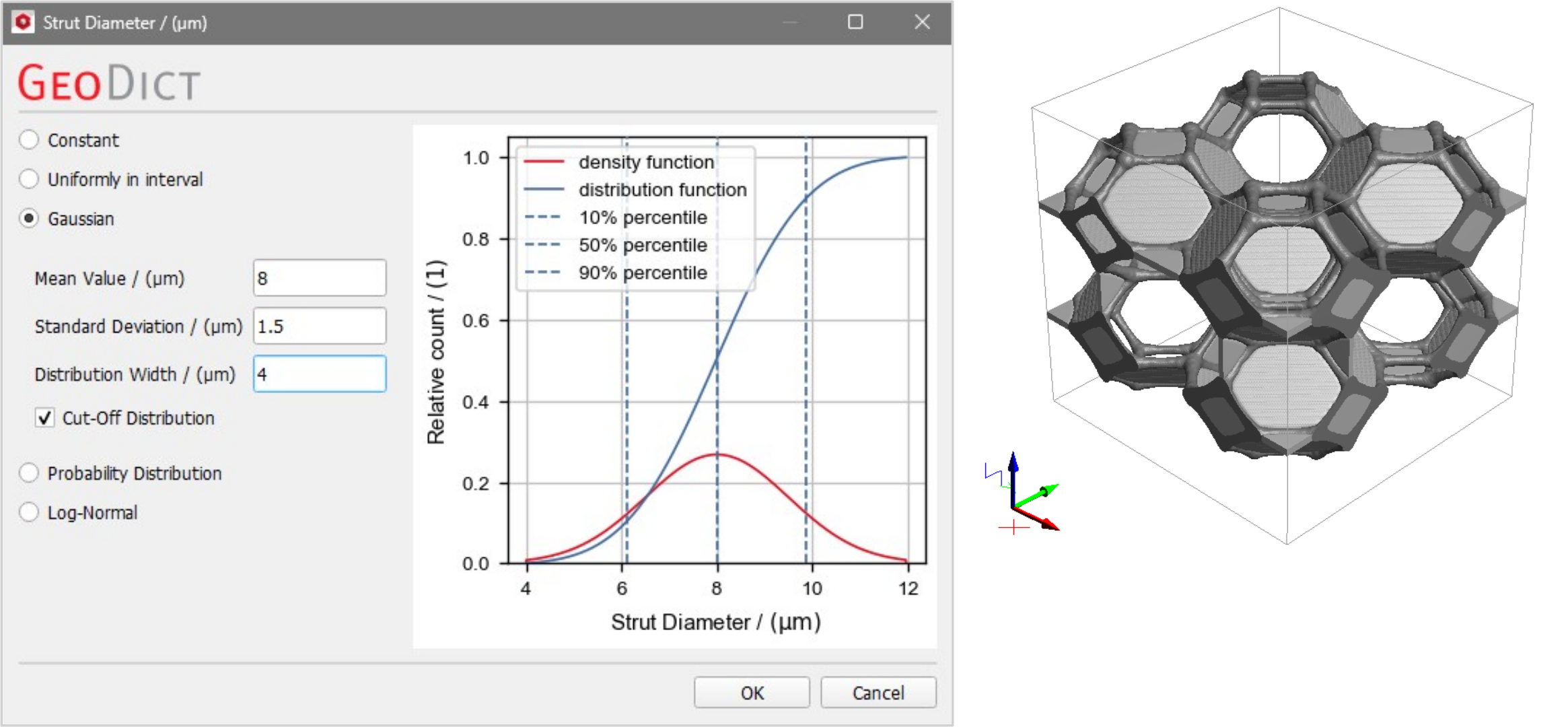 If Cut-Off Distribution is checked, the distribution is truncated at the bounds. This means, that all values outside the bounds are dropped and not considered for generation. If this option is not checked, then all values that are outside of the bounds are set to be on the distribution bound. The Probability Distribution table describes the probability that the strut diameter takes certain values. The Number of Rows can be increased or decreased to enter as many Values and their Count Probability between 0 and 1 as desired. For large tables, it is useful to observe the value of Probability Sum. It corresponds to the sum of the count probabilities. When the Probability Sum is not equal to 1, click the Normalize button to automatically normalize the Count Probability values, such that the probability sum is 1. Use Load and Save to load a probability distribution previously saved as *.txt file or to save the current one for later use. The Log-Normal distribution describes the situation in which the logarithm of the strut diameter follows a Gaussian distribution. The strut diameter values group around the entered Arithmetic Mean Value but may diverge according to the entered Arithmetic Standard Deviation. The values in Lower Bound and Upper Bound limit the possible values under and over the arithmetic mean value, thus restricting the values that the random diameters can take. The effect of Cut-Off Distribution is the same as described before when choosing Gaussian distribution. |
The Strut Thinning Factor determines the rate by which the diameter of the strut diminishes towards the middle of one strut. The Strut Thinning Mode determines if this thinning is length dependent or not. Select Fixed to thin all struts equally, independent of their length. Choose Length Dependent for a thinning dependent on the length of each strut. Short struts have less thinning than long struts. Thinning factor values vary from 0 to 1. When the value is 0, the strut diameter does not change. For fixed strut thinning, with a value of 0.5, the strut diameter decreases by 50% from near the nodes to the middle of the strut. For length dependent strut thinning, the strut diameter decreases by 50% from the nodes to the middle for the longest strut. The other struts have less thinning, dependent on their relative length, compared to the longest strut. The effect of different thinning factors for the thinning mode Fixed is shown here. 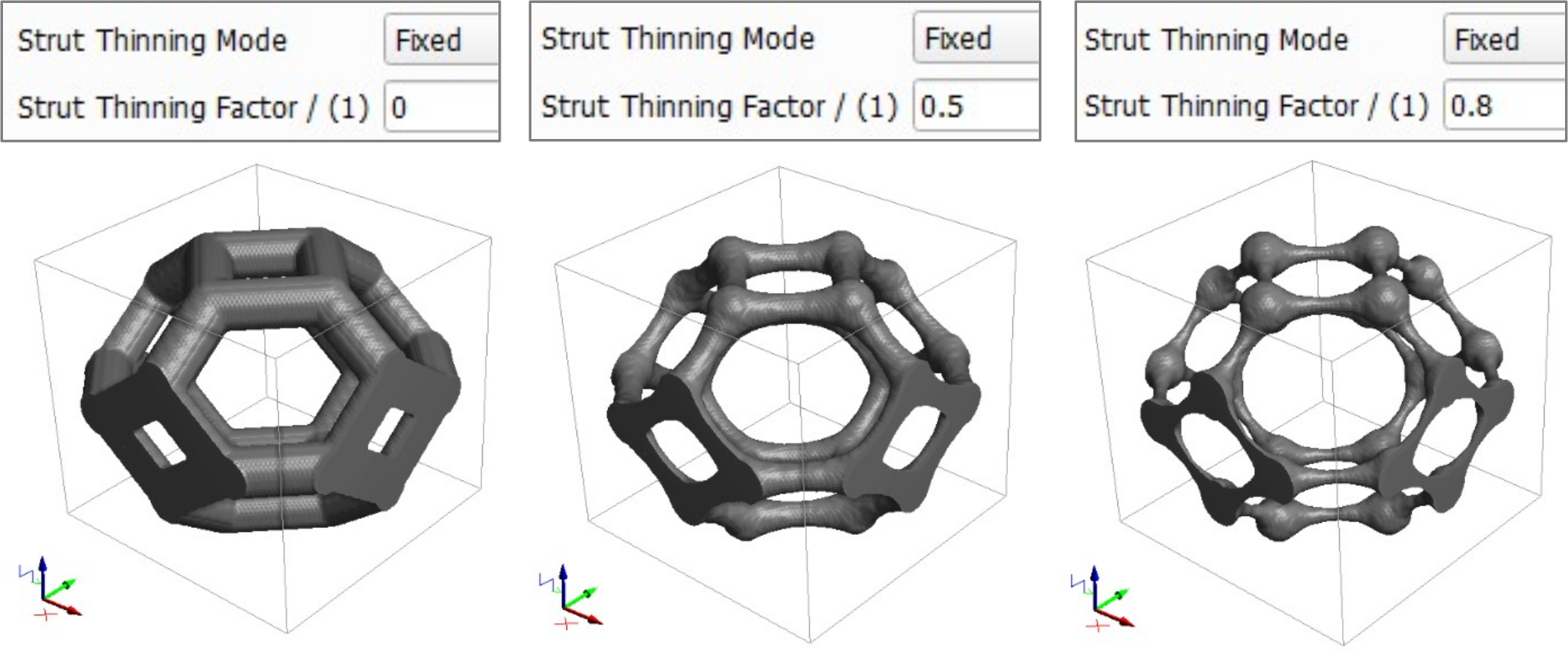 Since the effect of length dependent strut thinning is better visible for random foams, an example is shown in the Foam Options section of the Random Foams. |
©2025 created by Math2Market GmbH / Imprint / Privacy Policy
