Change Material ID Model
With the Change Material ID Model command it is possible to create objects that consist of different material IDs. Click the GadGeo Options Edit… button to open the Change Material ID Model dialog.
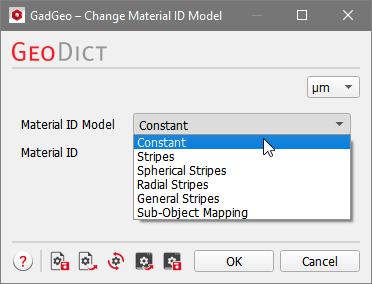
Choose between six different material ID models. The chosen model will be applied to all GAD objects when the Run button is clicked.
 Constant
With the Material ID Model set at the default Constant, each object is assigned the single selected material ID.
|
Stripes
Stripes creates stripes of different materials in a direction given by one of the intrinsic directions of the object.
|
Spherical Stripes
Spherical Stripes creates stripes of different material IDs around the center of the object.
|
Radial Stripes
Radial Stripes creates stripes of different material IDs around the main axis of the object.
|
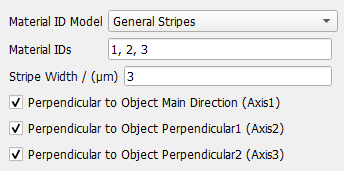
General Stripes
General Stripes is a generalization of the other models. For each axis, set if there should be a stripe pattern when moving along this axis. Thus, when all axes are checked on, spherical stripes will be created, if only axes 2 and 3 are checked, radial stripes are created, and if only one axis is checked, a stripe pattern along this axis will be created.
|
Sub-Object Mapping
Sub-Object Mapping allows to select different material IDs for the different parts of a CombinedObject.
This is particularly useful for User-Defined Objects and structures created using those objects as described here. For the 3D cross example that consists of three ShortCircularFiber GAD sub-objects, every sub-object can get a different material ID assigned.
|

