General Options Tab
Check Add to Current Structure to add the defined objects to the current structure. Uncheck this box to create a new 3D structure.
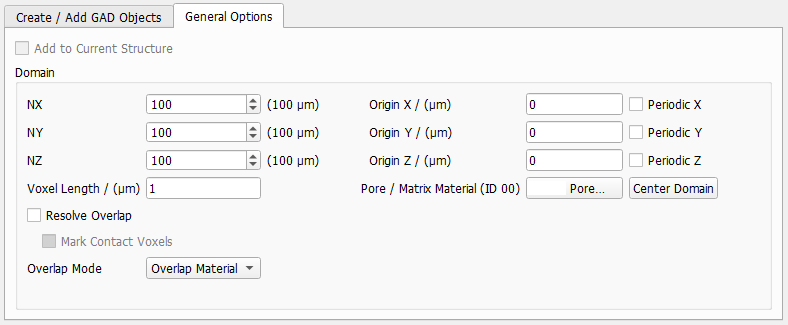
NX, NY, and NZ define the number of voxels in X-, Y-, and Z-direction, and Voxel Length establishes the voxel size. Origin X, Origin Y, and Origin Z control the Cartesian origin of the structure, and checking Periodic X, Periodic Y, and/or Periodic Z allows generating periodic structures. Click Center Domain to move the structure so that the Cartesian coordinates’ origin (0,0,0) lies in its center.
Choose the material of the pore space or the matrix around the fibers from the Pore/Matrix Material (ID 00) pull-down menu. When the material with Material ID 00 is chosen to be Pore, the objects in the structure are embedded in empty pore space. Otherwise, the material filling the matrix can be chosen to be any of the Solid, Porous, or Fluid materials currently in the GeoDict Material Database.
Handling overlap between structures
Generated objects may overlap, and a decision has to be made how the overlap will be treated. Overlapping areas may be assigned to one of the objects or form an “overlap object” themselves.
If Resolve Overlap is chosen, the overlap is resolved after the structure is generated. Every voxel in the overlap area is assigned to one of the objects. This assignment is done based on a watershed algorithm on the overlap area.
If additionally, Mark Contact Voxels is checked, a Contact Voxels Material ID must be selected. Voxels on the boundary between two objects are then given this material ID.
If the overlap stays unresolved, overlapping areas form additional overlap objects. The Overlap Mode defines how a material ID is assigned to these overlap objects.
The overlap areas can be assigned to be the default Overlap Material. The ID of the overlap area is obtained by the bit-wise sum of the IDs of the overlapping materials.
The overlap can take the ID of the New Material. Objects are added in the order as listed under the Create/Add GAD Options tab. This means that in this case, the overlap area is of the same material as the object that was added later.
The overlap can take the ID of the Old Material. Objects are added in the order as listed under the Create/Add GAD Options tab. This means that in this case, the overlap area is of the same material as the object that was added earlier.
With Given Material, you can freely select a material from the GeoDict Material Database. Select a Default Overlap Material ID, and define an arbitrary Number of Overlap Rules. The default material is used, whenever none of your user defined overlap rules applies.
