Generate Complete Filter Set
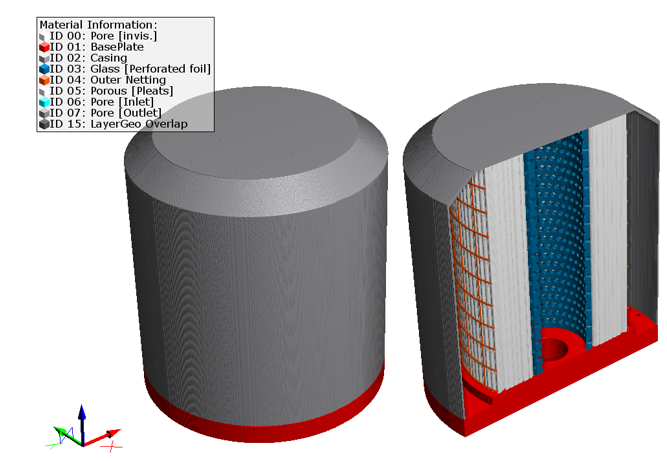
The Generate Complete Filter Set app generates an individual complete filter including casing, perforated foil, bottom plate, outer netting and pleat. It is also possible to only generate any subset of these filter parts.

|
Modules needed to run this GeoApp:
PleatGeo
|
Clicking Edit opens the Generate Complete Filter Set Parameters dialog.
The parameters are organized in six groups, available through the Parameter Group Selection.
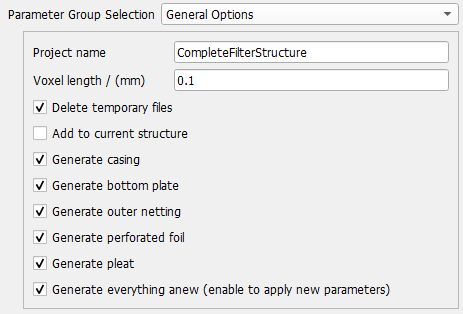
 General Options
In the General Options group specify a Project name for the folder containing all the results and the Voxel length for the filter set.
Check Delete temporary files to delete intermediate results after the filter generation.
Check Add to current structure, if a filter structure is already loaded in GeoDict and needs some more components as for example a casing.
Decide which parts of the filter set should be generated. The possible filter parts are casing, bottom plate, outer netting, perforated foil and pleat. Define the corresponding parameters for each filter part in the respective parameter group available from the pull-down menu for Parameter Group Selection.
Enable Generate everything anew (enable to apply new parameters) if a completely new filter should be generated. If not checked, the GeoApp expects the corresponding filter parts to be in the folder specified by Project name.
|
Bottom Plate
Define the Bottom Plate parameters.
When checking Set center hole as outlet, secondary holes as inlet, the pore space in the holes will be set to a new material ID to define it as inlet and outlet for simulations. If simulating for example a flow experiment on the structure, the fluid then will enter the filter through the small holes in the outer circle of the bottom plate and, after passing the other filter parts, leave the filter again through the bigger hole in the middle.
Learn more about the flow experiment in the FlowDict handbook.
Otherwise, the holes are defined as material ID 00, like all other pore voxels in the structure.
|
Casing
Define the parameters for the applied Casing.
|
Outer Netting
Define the Outer Netting parameters.
The Resolution of horizontal bar defines the resolution of the circular shape, i.e. a higher resolution results in a smoother circular shape of the horizontal bars. The resolution determines the number of points calculated in order to approximate a circle.
|
Pleat
Define the Pleat parameters. For the pleat parameters refer to the PleatGeo handbook.
|
Perforated Foil
Define the Perforated Foil parameters.
|
Results
Clicking Run creates the filter set including the selected components.