Optimize Pleat Count
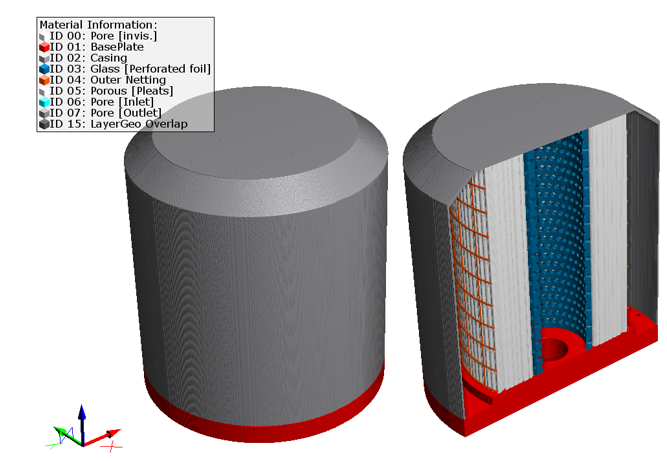
The Optimize Pleat Count app generates a complete filter with different numbers of pleats and runs a Flow Experiment on them.
|
Modules needed to run this GeoApp: PleatGeo, FlowDict |

Clicking Edit opens the Optimize Pleat Count Parameters dialog.
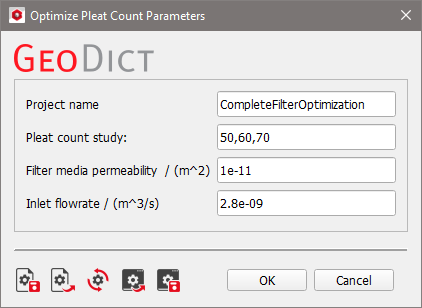
Choose a Project name for the folder containing all results from the experiment.
Enter the Pleat Counts to study as a comma-separated list.
Determine the Filter media permeability in m² and the Inlet flowrate in m³/s.
Results
Clicking Run starts the pleat count study. When the experiments are finished, the FlowDict results corresponding to the given pleat counts are loaded to the Result Viewer and combined into one result file. By default, the pleat counts 50, 60 and 70 are examined, resulting in three result files. To learn more about the FlowDict results, refer to the FlowDict handbook. The generated complete filters are generated as described for the Generate Complete Filter Set app.
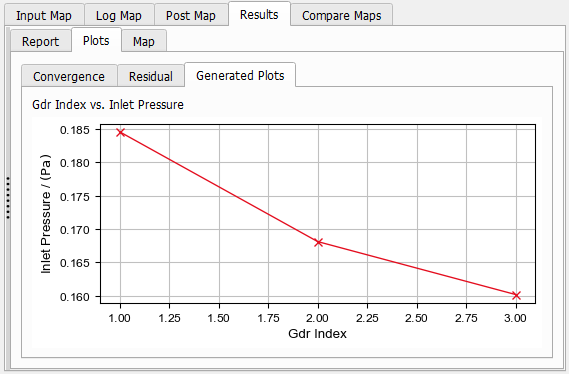
In the combined result file, the desired results can be plotted in customized plots, as described in the Result Viewer handbook. By default, the Plots tab contains the Convergence, the Residual and the Generated Plots. The last tab shows the Inlet Pressure for each flow result.