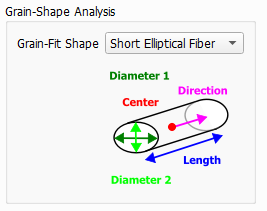
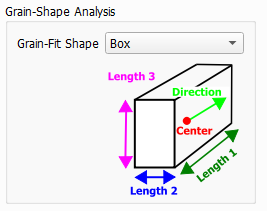
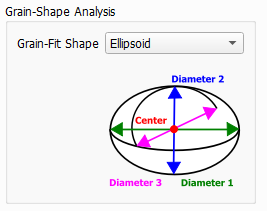
After the grain identification step (defined by the parameters under Initialization, Grain-Fragment Reconnection and Domain-Boundary Options), the shape of the grains is analyzed. This analysis is done by fitting one selected object type into the identified grains. Choose the Grain-Fit Shape that fits best to the grain shapes appearing in your structure.
An ellipsoid can be fitted to the identified grains.
To define such an ellipsoid, a center point and three diameters are needed.
In the following, we set
to be the length of the longest of the three diameters,
to be the length of the medium diameter,
to be the length of the shortest diameter.
A pair of diameters is similar if its size ratio (the smaller diameter is divided by the larger diameter) is larger than 0.875. Two diameters differ, if their ratio is smaller than 0.875.
Four shapes for the ellipsoids can be fitted into the grain:
An ellipsoid is formed as a Flat Bar, if all three diameters , , and differ much from each other.
A Prolate Spheroid has one bigger diameter, , and the two smaller diameters, and , are similar to each other. Its shape is similar to a cigar.
The two bigger diameters ( and ) of an Oblate Spheroid are similar. Thus, it can be compared to a disk.
For a Sphere all three diameters , , and are similar.
With the last option, a box is fitted into the grains.
To define such a Box, a center point and three lengths are needed.
Four shapes of a box can be fitted into the grain:
If the all three lengths differ a box is called Flat Bar.
For a Rectangular Bar the two shorter lengths are equal.
For a Rectangular Disk the two larger lengths are equal.
If all three lengths are equal the box is a Cube.
The following figure shows the results of Grain-Shape Analysis on a grain structure. These visualizations are loaded from the Results Viewer of the *.gdr result file (under the Grain Visualization tab).
On the left, the structure is shown after grains are identified, and the grain fragments are removed at the domain boundary. The middle image shows the shapes of ellipsoids fitted to the grains. The right image shows a comparison between the identified grains (red) and the ellipsoid shapes fitted to them (gray). The matching voxels are shown in blue. This visualization provides a validation of the fitting to the ellipsoid shapes. A fitting is very good when a high percentage of overlap is observed, meaning that the fitted ellipsoids overlay the grains with high accuracy.
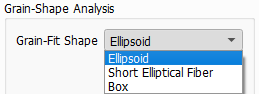
 Fit Shape Short Elliptical Fiber