4 Byte Float or Int File Formats
VOL files are 3D image data files with variable header length. GeoDict assumes VOL files to contain floating-point representations of three-dimensional (or volume) images. The import dialog also offers the option to import integer values.
The ordering of the information is the same as for the RAW file format and, as in the RAW file format, a file header may be present.
Different from RAW files, always 4 bytes are used in the representation of the image, and these 4 bytes may be read as floating-point number or integer value. Like in the RAW files, the Header Size, the number of voxels (NX, NY and NZ) and the Voxel Length are not contained in the file and must be entered in the Geometry Import dialog before importing.
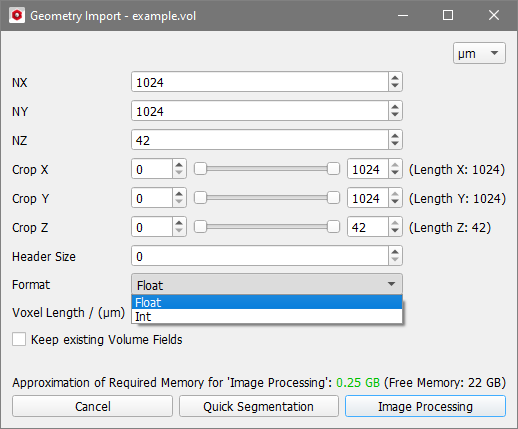
Some other software packages do not follow GeoDict’s naming scheme, and produce VOL files with integer values in them, usually with 16-bit information. Should you have trouble importing VOL files and suspect that the file contains integer data rather than floating point data, it might be useful to try and change the Format option (see image above) to Int and then import the file.
Click Quick Segmentation to segment the image without image processing or click Image Processing to open the image in the 3D Image Processing dialog.
