3D Inhomogeneity
The 3D Inhomogeneity command calculates the distribution of the Solid Volume Fraction, Solid Density or Porosity in specified sub-volumes. Each sub-volume is a cube whose side length is specified by you.
The 3D Inhomogeneity dialog opens when clicking the Edit… button and includes the Statistic Options and Material Density tabs.
At the top of the dialog, enter the Result File Name. The result file is saved in the chosen project folder (File → Choose Project Folder in the menu bar).
Statistic Options
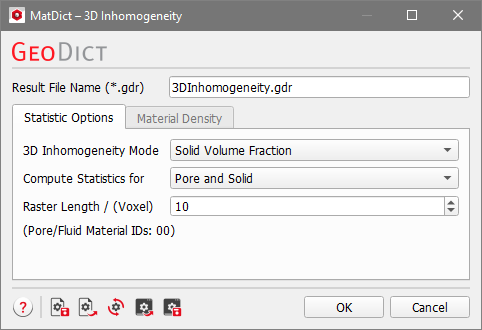
Choose the property to be computed from the 3D Inhomogeneity Mode pull-down menu.

Only when choosing Solid Density, the Material Density tab is selectable and the density values for the individual Material IDs must be defined there. For Solid Volume Fraction or Porosity, the density of the Material IDs is not considered in the calculations and the Material Density tab therefore not needed.
The choice in the Compute Statistics for pull-down menu controls whether the property is computed for all materials (Pore and Solid) or only for specified materials (Chosen Material) or for Chosen Material IDs.

For Chosen Material and Chosen Material IDs, the materials or IDs can be chosen from those present in the structure, which appear in a second pull-down menu below.
The Raster Length determines the side length of the cubic sub-volume in voxels. If Raster Length is not a common divisor of the side lengths NX, NY, NZ of the current structure, some boundary layers of the current structure will not be contained in any sub-volume. In this case, a warning will be plotted in the result viewer.

Material Density
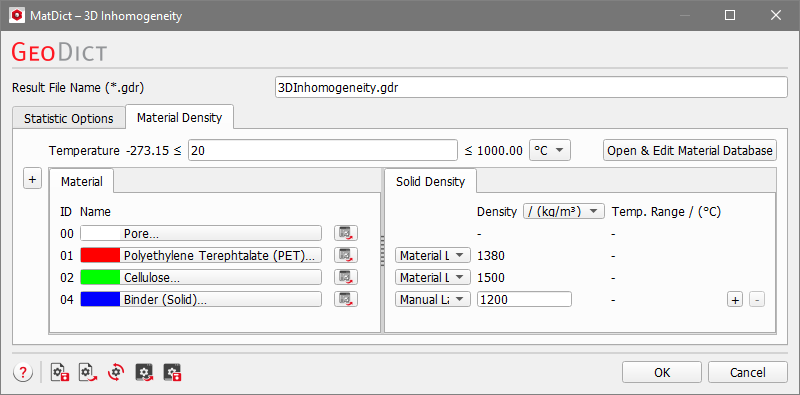
If Solid Density is chosen as the material property to be computed, the density of every material in the structure must be specified under the Material Density tab.
Under the Material Density tab, the temperature can be edited if the density of a material is temperature dependent. Additionally, the density of every solid material in the structure must be specified in this tab. The density can be given in kg/m3 or g/cm3. For materials from the GeoDict Material Database, the density value is entered automatically. If a material is set to Manual, the Material Law changes to Manual Law and more laws can be added or deleted by clicking the “+” or “-“ button on the right of the corresponding row. You can enter the density for manual materials directly in the Solid Density tab.
Topics of this section |
|---|
|
