Output Options
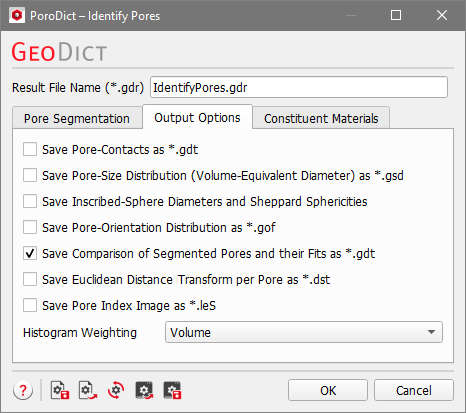
Under the Output Options tab, additional results to be computed and saved can be chosen. They are displayed later for visualization in the Result Viewer under the Pore Visualization tab. Some of these options need an additional computing effort and are unchecked by default.
|
Note! The following files are always saved as Output, independent of the selection in this tab:
|

|
Know how! New in GeoDict 2025: You can save the contacts between pores as structure file! |

- Check Save Pore-Contacts as *.gdt to save a structure file, where the pores have Material ID 01 and the contact areas have Material ID 02.
- Check Save Pore-Size Distribution (Volume-Equivalent Diameter) as *.gsd to save the computed pore size distribution as a volume field. This information can be used e.g. for visualization of the volume field of the Volume-Equivalent Diameter or for further analysis with Python.
|
Know how! You can modify the fields of the volume file after the computation in the post-processing widget in the Result Viewer. |
- When Save Inscribed-Sphere Diameters and Sheppard Sphericities is checked, the diameter of the inscribed sphere for every pore is calculated as volume field and saved. Both options need additional computing effort and are unchecked by default.
- Check Save Pore-Orientation Distribution as *.gof to use the orientation information in simulations or for later analysis.
- By default selected is to Save Comparison of Segmented Pores and their Fits as *.gdt, which is useful to evaluate the quality of the fitted GAD-objects (Ellipsoids). A good accordance of the pore fit shapes and the identified pores is important as a basis for generating good digital twins.
- After checking Save Euclidean Distance Transform per Pore as *.dst, the EDT for every pore is calculated individually and the result is saved in one single file (*.dst format). This option needs additional computing effort and is unchecked by default.
- The resulting pore index image is saved by default in the binary *.g32 format. With the last option, Save Pore Index Image as *.leS, it can be additionally saved as an ASCII file. This format takes more space and needs longer to write and load into GeoDict, but it is human-readable and can easily be imported into other software.
Choosing Histogram Weighting as Volume, Surface or Number changes the values on the Y-axis of the resulting histogram plots. Then, either the pore volume probability, the pore surface area probability, or the pore count probability is shown. The histogram weighting can also be changed in the result viewer after the simulation has been run.

