|
Navigation: GeoDict 2025 - User Guide > Material Modeling > WeaveGeo > Single-Layer Weave > Satin Weave |
Scroll |
Weave Shape
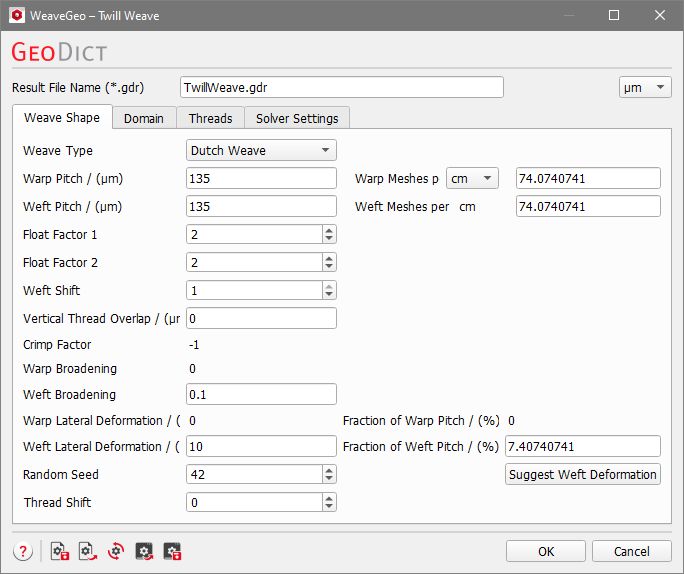
The parameters for the Satin Weave are similar to those for the Plain Weave. First, all the parameters which also appear in the Plain Weave dialog are described. Below, find the descriptions for the other parameters.

The weave type can be selected from the Weave Type drop-down menu. The available weave types are Regular, Dutch Weave, and Reverse Dutch Weave.

Warp (and Weft) Pitch is the distance between the center lines of two adjacent warp (or weft) threads. This corresponds to the sum of the aperture and the thread width. The aperture is equal to the pore space between two consecutive threads. It is not explicitly entered in the dialog, but implicitly defined by the warp (or weft) pitch. The thread width is specified in the Threads tab of the dialog. The warp (or weft) threads touch if the entered pitch is equal to the width of the warp (or weft) thread. The warp pitch and weft pitch can also be entered as Warp Meshes per Inch or Warp Meshes per cm and Weft Meshes per Inch or Weft Meshes per cm. This is equivalent to the number of threads of warp or weft per inch or cm in the structure. These values are changed automatically when modifying the values for Warp Pitch or Weft Pitch, and vice versa. |
The amount of overlap that the threads show at their crossing points is determined by the amount of Vertical Thread Overlap. Negative values can be used to enforce distance. The overlap, corresponding to the entered value of vertical overlap, is shown blue in the figure below (for the chosen color settings for warp and weft). The thread overlap has no physical equivalent, but it is helpful to simulate the deformation of threads at their touching points. |
The Crimp Factor defines the straightness of the warp and weft threads. It varies between -1 and 1. A value of 1 for the Crimp Factor results in straight weft threads, which is equal to the weave type Reverse Dutch Weave. A value of -1 results in straight warp threads, which is equal to the weave type Dutch Weave. When the crimp factor is set to 0, both thread types are bent around each other, leading to a thinner structure in Z-direction. Consequently, for the weave types Dutch Weave and Reverse Dutch Weave, the Crimp Factor cannot be changed. For the weave type Regular, the Crimp Factor allows to model all possible gradations between the extremes Dutch Weave and Reverse Dutch Weave. |
Warp and Weft Broadening are the widening of the threads at the crossing points of weft and warp threads. This simulates the bending and deformation of the threads during the weaving process. Values of broadening vary between 0 (no broadening) and 1 (maximum broadening). This means the new thread width is between 100% and 200% of the original thread width. When Dutch Weave is chosen, the Warp Broadening is fixed to 0, because the corresponding threads are straight and do not deform. Analogously, for Reverse Dutch Weave the Weft Broadening is fixed to 0.
|

Random Seed initializes the random number generator behind the structure generator. Changing its value produces different sequences of random numbers and hence, different realizations of the specified structure. If all settings are equal, generating with the same Random Seed value produces exactly the same structure. The Random Seed is a non-negative integer number. It affects the structure generation, if for example Random Multifil threads are used and Weft/Warp Lateral Deformation is applied (as for the warp thread in the example below). For twill weave and satin weave, the realization of other parameters is also influenced by the chosen random seed. This is mentioned when the corresponding parameters are explained. |
The option to choose the Thread Shift is only available when choosing Dutch Weave or Reverse Dutch Weave. With the default value of 0, the weft threads (or warp threads, in case of Reverse Dutch Weave) run perpendicular to the warp (or weft) threads. When choosing a value of -1 or 1, they run diagonally. |
The Satin Float Factor value, special to the satin weave, may vary from 4 to 10. It controls the number of weft threads floating over the warp threads. Typical satin weaves are the Satin 4/1 and the Satin 7/1, corresponding to satin float factors of 4 and of 7. |
The Weft Shift defines the offset between successive weft threads. For Satin Weaves the available options differ from those available for Twill Weaves. In twill weaves, the offset is limited to 1 or -1, while for satin weaves it is at least 1 and the maximal value depends on the chosen float factor. The Weft Shift is an integer number and is at most one lower than the Satin Float Factor. For example, for a Satin Float Factor of 4 the feasible values for the Weft Shift are 1, 2 and 3. In the figures below, for a satin 4/1, observe the effect of choosing a weft shift of 2 or 3. The figures show the same structure, once viewed from above and once from below. |
Warp Lateral Deformation and Weft Lateral Deformation model the change in thread shape in the X-Y-plane during the process of weaving. They can either be set directly, or as percentage of the warp or weft pitch (Fraction of Warp Pitch or Fraction of Weft Pitch). Such deformations might occur for example through imperfections during the weaving process. The realization of the lateral deformation is influenced by the current Random Seed. Suggest Deformation If Dutch Weave is chosen as weave type, the button Suggest Weft Deformation appears. Similar, if Reverse Dutch is selected, the button Suggest Warp Deformation is shown. The suggested deformation depends on the settings made under Weft Pitch (or Warp Pitch) and Thread Diameter. If the pitch size is chosen such that neighboring threads do not overlap (pitch size ≥ thread diameter), the suggested lateral deformation is zero and the threads run straight. If the threads would overlap, the lateral deformation is set to half of the differential distance when clicking the button. When choosing the FreeWeave solver in the Solver Settings tab, the lateral deformation cannot be defined. The solver finds this value automatically. |
©2025 created by Math2Market GmbH / Imprint / Privacy Policy
