Acoustic Database
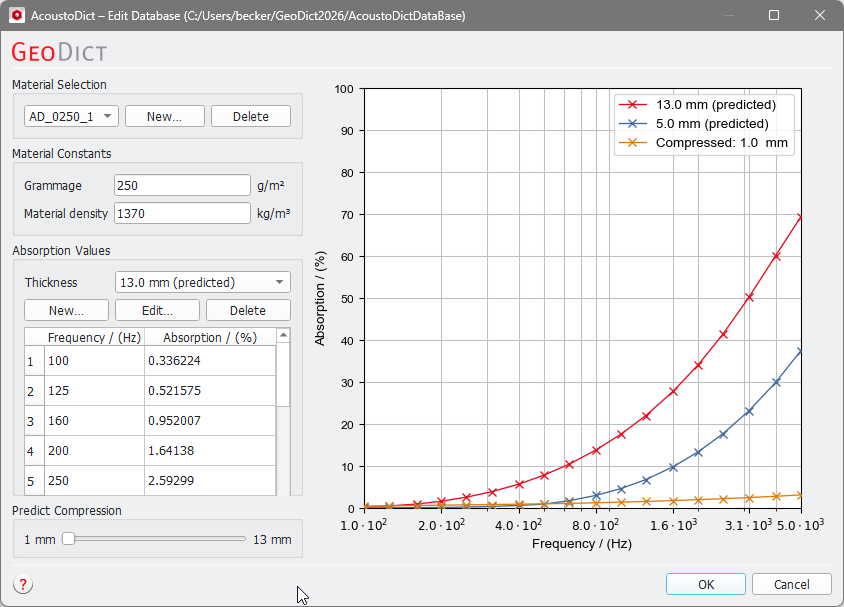
To edit the Acoustic Database, select Acoustic Database from the pull-down menu and click the Options’s Edit…. button in the AcoustoDict section. The AcoustoDict Edit Database dialog box opens, showing the path to the database in the caption.
Material Selection
Select the currently displayed material from the pull-down menu in the Material Selection panel.
To add a new materials to the database, click New…. and enter the Material Name. For new materials, no absorption values are initially given and have to be entered in the Material Constants and Absorption Values panels below.
Materials can be removed from the database by clicking Delete and confirming the deletion.
Material Constants
Grammage and Material density of the selected material are shown (and are editable) in the Material Constants panel. The Material density is the density of the constituent material of the fibers, not the density of the porous medium.
Absorption Values
In the Absorption Values panel, a table shows the sound absorption at given frequencies for the selected material. Absorption values may exist for various compression levels of the same material, where the level of compression is described by its Thickness.
Click Delete to remove all data for the selected thickness.
The table displayed in the Absorption Values panel is not editable. To change the table values, click Edit... to open the Edit Absorption Values dialog.
In the first line, you can change the material's Thickness. Below, select how the data will be entered. Select Manual Input to enter the acoustic absorption of real materials, experimentally measured in an impedance tube, and available in a data sheet. You may use the Insert Row and Delete Row buttons to enter the values manually in the table, or you might right-click into the table and save the table date to a text file, edit the text file and load the data back into the table, or simple use Ctrl+C & Ctrl+V to copy & paste from the clipboard.
Alternatively, the sound absorption values may be predicted from a measured or simulated flow resistivity. The fluid flow results can be given either by the Flow Resistivity or by Pressure Difference and Velocity.
The Delany–Bazley model is then used to compute the frequency-dependent absorption values. After clicking OK, the computed absorption values are entered into the table and the word (predicted) is added behind the thickness value in the drop-down-menu:

Click New… to enter frequency and absorption values for an additional compression level. Use the Edit Absorption Values dialog as described above. The entered values can be edited at any time by clicking the Edit… button. This reopens the Edit Absorption Values dialog box. Finally, click OK in the Edit Database dialog box to save the newly entered or the edited materials in the AcoustoDict Database.
Predict Compression
When data for the same material at different degrees of compression exists, the chart on the right hand side of the dialog shows the absorption curves for each material thickness. In this case, the slider in the Predict Compression panel at the bottom left corner is activated and you can obtain predicted acoustic absorption curves for arbitrary thicknesses.

The prediction relies on the fact that the Delany–Bazley model allows to compute the sound absorption from the viscous flow resistivity of the porous material. This is combined with an approximation for the dependency of the viscous flow resistivity of the porous material on the thickness of the material. AcoustoDict uses the ansatz function
where is the thickness-dependent density of the porous material. Under the assumption of mass conservation, the density can be computed from the Material density of the constituent fiber materials, the porosity of the uncompressed layer and the rate of compression. Note that the Grammage and the Material density of the constituent fiber material need to be entered in the Material Constants panel for this computation to be accurate.
When values for at least two different thicknesses (i.e., at least two pairs ) are known, the ansatz function can be solved for and . After and are determined, the viscous flow resistivity can be estimated for any material thickness, and thus a prediction of the sound absorption with the Delany–Bazley model becomes possible.
