Pop-Up Functions
Sometimes you don't want pop-up dialogs to show and sometimes you want to show some custom messages. Use the following API functions to do so.
 gd.getBlocker
Get a Blocker object to prevent GeoDict Dialogs from showing up. Use this function via 'with' keyword.
Input: None
Example:
For example, if saving images from a macro from different structures with a solid ID not shown, GeoDict will ask for every structure loading, if this material ID should be visualized. But the blocker command prevents the dialogs from showing up:
|
gd.msgBox
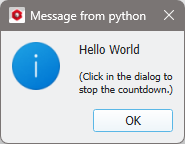
Displays a simple message box containing the given basic Python value (string, integer, float, …) and an OK button. The execution continues after clicking OK. This function is useful for debugging. The command has no return value.
Input:
- message, any basic Python value (integer, float, string, bool, ...)
Example:
|
gd.showGDR
This will open the given GDR file contents within a GeoDict dialog. The command has no return value.
Input:
Example:
For example, if a result file with the name Example.gdr is saved, it can be opened in the Result Viewer with this command:
|