Coarsen
Check Coarsen during creation to enable coarsening during mesh creation.
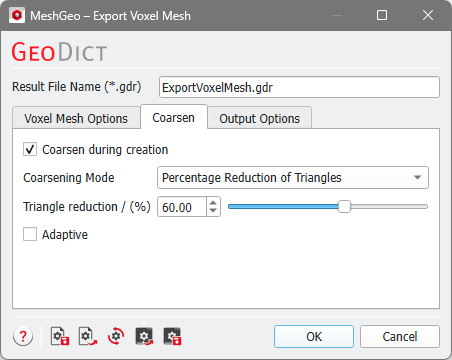
Coarsening Mode
MeshGeo provides three modes to coarsen triangulations, based on the stopping criteria for the coarsening algorithm: by Percentage Reduction of Triangles, by Edge Length, and by Target Number of Triangles.
The coarsening algorithm reduces the number of triangles in the currently loaded mesh by combining short edges to longer edges. Depending on the choice of Coarsening Mode, the different stopping criteria and their corresponding input parameters are shown.
 Percentage Reduction of Triangles
Percentage Reduction of Triangles removes at least the given percentage of triangles. The reduction of the triangle number is done with an iterative algorithm. The algorithm stops, if either the requested reduction is achieved, or no further reduction is possible.
To choose the value under Triangle reduction / (%) by either entering it in the field or moving the slider.
In the screenshots below, the effect of reducing the number of triangles by 25 % and 75 % is shown.
|
Edge Length
With the Edge Length mode, the number of triangles in the current mesh is reduced depending on two inputs: Minimum Edge Length and Maximum Edge Length.
The input given for Minimum Edge Length sets the length of edges to be removed. All edges shorter than this value are removed in the algorithm.
The input given for Maximum Edge Length sets the upper bound for the created edges which should not be exceeded.
The coarsening algorithm takes all edges smaller than the minimum edge length and combines them until no edge is smaller than the minimum edge length. The algorithm tries not to exceed the maximum edge length in the process.

|
Note: Nevertheless, it is not always possible to satisfy the given maximum edge length.
|
|
Target Number of Triangles
Target Number of Triangles reduces the number of triangles in the current mesh until the Target Number of Triangles is reached.
|
Adaptive
Adaptive is only available for the modes Percentage Reduction of Triangles and Target Number of Triangles. With Adaptive, the coarsening algorithm minimizes the deviation of the coarsened surface from the original surface. The Adaptive algorithm generates a mesh with a non-uniform triangle size and can lead to triangles with bad aspect ratios.
When the Adaptive mode is disabled, the coarsening algorithm works based on the edge lengths in the mesh.
