|
Navigation: GeoDict 2025 - User Guide > Simulation & Prediction > BatteryDict > Battery > Charge Battery |
Scroll |
Experiment
All parameters defining the charging simulation of the battery are defined on this tab.
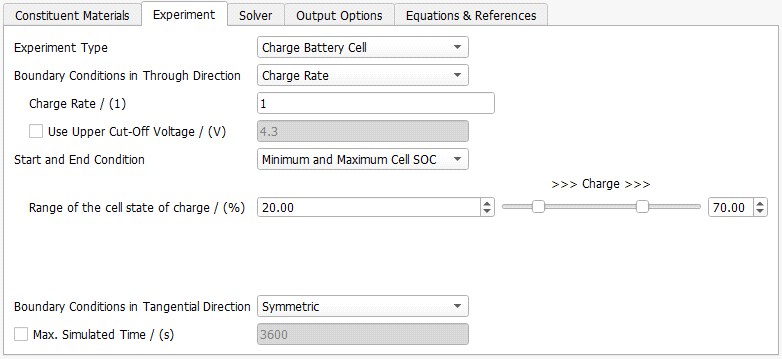
From the pull-down menu Experiment Type, select the appropriate entry to simulate the charging or discharging of the battery cell or to set a charging profile. Here, a charging simulation is chosen. For the experiment types Charge Battery Cell and Discharge Battery Cell select the Boundary Conditions in Through Direction and the Start and End Condition. How to Set a Charging Profile is explained here. |
 Boundary Conditions in Through Direction
The Boundary Conditions in Through Direction can be specified by a Charge Rate, a Current Density, by defining the Current in Ampere (A), or by defining the Cell Potential.
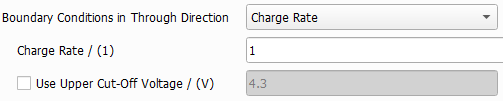
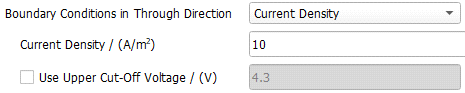

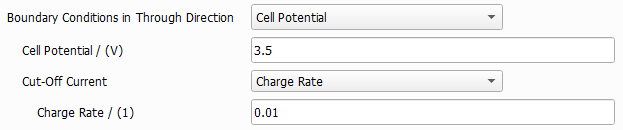 |
The second Start and End Condition for the charging simulation can be defined in several ways:



|

Charging Profiles are a series of charging, discharging, and relaxation simulations that are performed sequentially for the same structure. 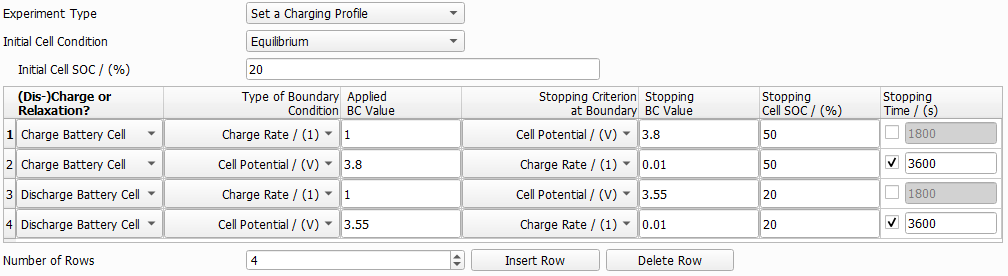 If Set a Charging Profile is selected as Experiment Type, the starting point for the first simulation can be defined

 The starting point for the following simulations, defined in the charging profile table, is always the final state of the previous one. To define a charging profile, choose as many rows for the table as simulation steps desired. Select for each step, if the battery is charged, discharged, or if relaxation is simulated. For charging or discharging, define the Type of Boundary Condition and the corresponding value, in the same way as for simple charging simulations. The same options for the boundary condition (Charge Rate, Current Density, Current, and Cell Potential) are available. For charging or discharging, next, the first stopping criterion for the selected boundary condition (Stopping Criterion at Boundary) is chosen for each simulation step. The available options depend on the Type of Boundary Condition (BC).
 Enter the Stopping BC Value for the first Stopping Criterion, for the second stopping criterion a stopping state-of-charge for the whole cell (Stopping Cell SOC / %) and for the (optional) thirst stopping criterion a Stopping Time. The computation ends for each simulation step, if the first one of the stopping criteria is reached. The next simulation step will continue from this state. For relaxation, no boundary conditions need to be defined, only the stopping time as the only possible stopping criterion of the relaxation step. In a relaxation step, the return of the battery cell to an equilibrium state after charging or discharging is simulated. The solver settings, including the time step, are set by BatteryDict to optimize the simulation time required for the relaxation step. |
Boundary Conditions in Tangential Directions
Periodic or Symmetric boundary conditions can be selected for the Boundary Conditions in Tangential Directions. For periodic boundary conditions, the structure is assumed to repeat periodically in Y- and Z-direction and for symmetric boundary conditions, the structure is mirrored in Y- and Z-direction and the Li+ ions and electrons are reflected at the boundary in Y- and Z-direction. The connected and unconnected parts of the active materials and electrolyte depend on the boundary conditions, so they are determined when the simulation begins. |
You can set a third end condition to the charging simulation by checking Max. Simulated Time. The simulation ends if the charging process exceeds the Max. Simulated Time. Note that the Max. Simulated Time is not the time that the solver is given for its computation, but it is the time, the simulated battery is given for charging or discharging. Max. Simulated Time Let us consider a battery that is charged from 20% state-of-charge to 70% state-of-charge at a charge rate of 1C. The battery takes 30 min to charge. If the Max. Simulated Time is set to 600 seconds (10 min), then in this example, the battery will only be charged from 20% to 36.67% state-of-charge.
|

©2025 created by Math2Market GmbH / Imprint / Privacy Policy
