Constituent Materials
If the structure of a single electrode is loaded in GeoDict, this structure is considered as the cathode for the half cell simulation.
The half cell is created by attaching the electrode in X+ direction to the separator. The lithium reservoir will be attached in X- direction to the separator.
If a material ID for the separator is provided, it must adhere to the rule that the half cell is assembled in the X-direction.
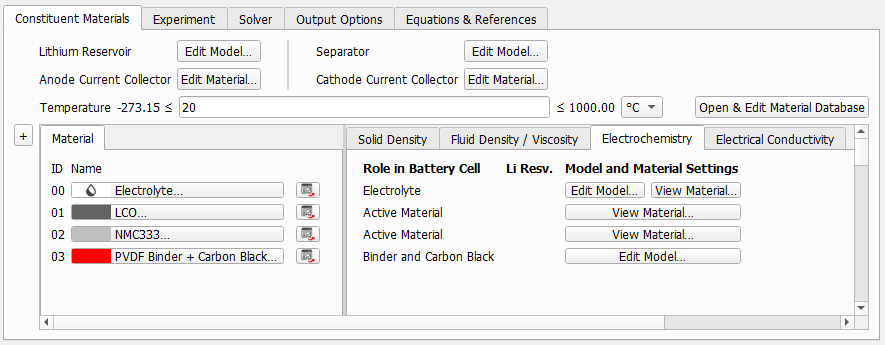
On top of the tab, the parameters for anode current collector and lithium reservoir can be modified. If not specified by a separate material ID in the structure, the parameters for the separator and the cathode current collector can also be defined.
If the structure is created with separate material IDs for cathode current collector and separator, these roles can be defined for the materials on the Electrochemistry subtab. In this case, the buttons for modifying the corresponding properties disappear from the top of the dialog.
 Lithium Reservoir Parameters
For the lithium reservoir, choose Edit Model to enter the width in number of voxels, the Maximum Exchange Current Density and the Effective Electronic Conductivity for the simulation.
|
Separator Parameters
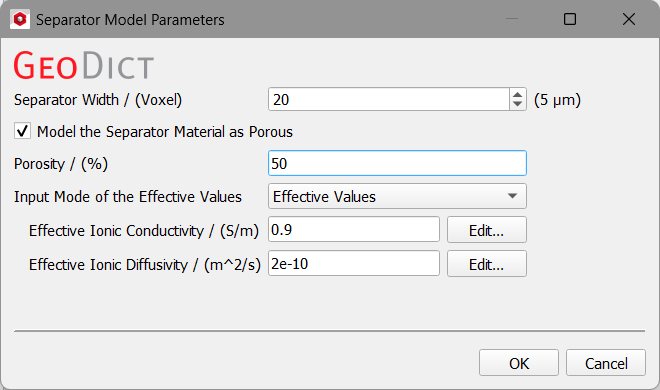
For the separator, with Edit Model the width of the separator can be selected in number of voxels. Additionally, as already explained for the Charge Battery simulation the ionic conductivity and ionic diffusivity of the electrolyte can be selected, or effective values can be defined. If Model the Separator Material as Porous is unchecked, the separator will be have the same properties as the electrolyte for the simulation. When using a solid electrolyte in an all-solid-state electrode, porous separator (and porous Binder / Conductive Additive) is always unchecked.
|
Current Collector Parameters
Width, material, and electronic conductivity of the current collectors can be defined with the corresponding Edit Material buttons.

|
Important! Even for materials from the GeoDict Material Database, the effective electronic conductivity needs to be defined in the dialog. It is recommended that the value defined is not higher than 1000 S/m to avoid numerical problems of the solver (see Electrical Conductivity for more details).
|
|
Electrode Material Parameters
In the Constituent Materials tab, materials available for the electrode are shown. In the same way as for battery charging, the parameters of the materials can be shown or modified.
|