Size Distribution
The Size Distribution tab contains a table with the particle size distribution. The table consists of at least two columns. The first column lists the Diameter of the particles. The second column contains the particle distribution. You can select if the percentages describe Mass %, Volume %, or Count % through the upper right pull-down menu.
Additional columns appear depending on the choices made under the Interaction Model subtab.
These columns are:
- Restitution for materials with Sieving collision model.
- Restitution and Adhesion for Hamaker material.
- Particle Density column for Individual per particle type densities.
- Particle Charge column for Individual per particle type charges.
- Collision Diameter column for Individual per particle type collision diameters.
For user-defined collision models, the number of material parameters to be entered in the table is specified in the UDF.
By clicking on a column heading, all values in the selected column can be set to the value in the first row. The entries in the table do not need to be sorted.
Click Delete Row to delete the currently selected row. Click Insert Row to insert a row below the currently selected row. Click Clear All to remove all rows.
Click Import… to import data from an ASCII text file. Some example particle distributions are provided with GeoDict and can be found in the installation folder (Program Files/Math2Market GmbH/GeoDict2025/FilterDict).
More convenient than importing is often to simply copy & paste entries from an Excel table into GeoDict, which is supported by the size distribution table. To copy a table from Excel, first clear the size distribution table by clicking Clear All. Then, select the cells in Excel and press Ctrl+C. Then, click into the upper left cell in the size distribution table and press Ctrl+V. This works also if more than two columns are present.
If the entered percentages do not add up to 100%, a warning message pops up when closing the dialog. You can select to normalize the values automatically or to return to the dialog and adjust the percentages manually.
If Constant efficiency or Clogging is selected as pass through model, a fractional filtration efficiency value and the corresponding media thickness must be entered for each particle size. For example, with the definitions in the table below, 90% of the particles are filtered when passing through 1 mm of the media.
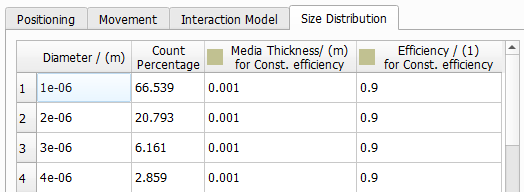
|
Know how! When using the Clogging model, enter the filtration efficiency of the clean filter media as efficiency value. Whereas, when using the Constant Efficiency model, it is recommended to use an efficiency value that represents an average efficiency value over the depth filtration phase. Enter the thickness of the flat sheet material or height of the filter geometry as Media Thickness, if the entered efficiency value corresponds to the complete thickness of the filter. |

If Velocity-dependent efficiency is selected as pass through model, efficiency values depend on the velocity as shown in the following screenshot. For example, with the definitions in the table below, at a particle velocity of 1 m/s, 70% of the particles are filtered when passing through 1 mm of the media.
 .
.