Interaction Model
For filter element simulations, it is generally assumed that not all parts of the filter media are resolved, and that porous voxels are present in the model. Therefore, the Pass Through Model column is always available.
For all materials in the model, a Pass Through Model, the Max. Particle Packing Density and a Collision Model must be set.
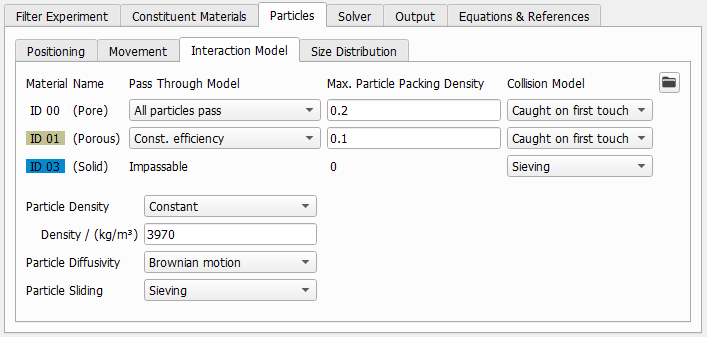
For each porous material, select on of the Pass Through Models All Particles pass, Constant absorption rate, Clogging, Constant efficiency, Velocity-dependent efficiency, or Impassable. If set to Impassable, the material is treated as a solid material and particles cannot enter.
Additionally, all compiled Pass Through UDFs that are stored in the users UDF folder, appear here as additional choices in the pull-down menus. Additional UDF folders can be selected with the  button.
If you select one of the models All Particles Pass, Const. absorption rate, Clogging, Const. efficiency, or Velocity-dependent efficiency, a voxel is filled until the Max. Particle Packing Density is reached. Once the voxel is filled, it automatically turns impassable for further particles and the approaching particles collide at the voxel surface. Select a Collision Model to determine how these collisions are handled. If Velocity-dependent efficiency is selected, it must be defined for each particle type in the Size Distribution table
In this sense, the user interface can be understood as follows: The Pass Through Model on the left is valid until the Max. Particle Packing Density is reached, and afterwards the Collison Model on the right applies. If the material is solid, the material is Impassable, thus the Max. Particle Packing Density is fixed to 0, and the Collision Model applies directly.
|
Know how! You can upscale the results of a fully resolved filter media simulation to determine the Max. Particle Packing Density. In the Report tab of a Filter Media - Filter Lifetime command, the Filter Clogging Analysis computes parameters that can be used as input here. Use the reported Cake Filtration value of as Max. Particle Packing Density of the fluid phase and the reported Depth Filtration value of as Max. Particle Packing Density of the porous filter material. |

|
Know how! The Collision Model of the fluid phase describes the behavior of particles when they arrive at the surface of a voxel filled with dust particles. In most setups, it is safe to assume that the arriving particle is deposited somewhere in the voxel on top of the filled voxel. In that case, Caught on First Touch is a good choice. Only in cases, where particles may bounce off from the filter cake surface, and get transported to a significantly different position, it is necessary to change this model to the Hamaker model. This might be the case for large particles, with high velocities, or with specific angle of attacks of the flow. |
Particle Density
If Individual per particle type densities are chosen, a new column called Particle Density is added to the table under the Size Distribution tab, and an individual density can be entered for each particle type or size. Otherwise, the Particle Density entered here is used for all particle sizes and types.
Particle Diffusivity
If Individual per particle type is chosen, a new column called Difusivity in Pore is added to the table under the Size Distribution tab, and an individual diffusivity can be entered for each particle type or size.
For Brownian Motion, the particle diffusivity is computed for each particle type according to equation (245) .
Particle Sliding
Particles that collide with the surface loose some of their energy if the restitution factor is smaller than 1. In certain pore geometries it may happen that the flow moves a particle very close along a pore surface, causing many consecutive hits and thus the repeated application of the restitution factor will cause the particle to stop moving at all. This behavior is often undesired, and it may overestimate the filter efficiency when combining a Sieving collision model with a relatively low restitution value.
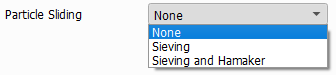
When Sieving is selected in the drop-down menu, all Sieving particle-wall collisions are modified, when Sieving and Hamaker is selected, all Sieving particle-wall collisions are modified and all Hamaker particle-wall collisons are modified. Caught on First Touch particle-wall collisions are not modified.
Enabling Particle Sliding for the Sieving or Hamaker collision models enlarges the tangential restitution factor when a particle hits a surface in a location that lies close to the last surface collision:
The first bounce on the wall is always treated the same, independent whether particle sliding is active or not: A particle arrives with a certain velocity, loses energy on impact, and bounces back again. The strength of the bounce-back is controlled with the given Restitution. When particle sliding is active, further impacts near the first hit are treated differently: Only the momentum perpendicular to the wall is reduced. The velocity along the wall is not reduced further, so in this direction the restitution is equal to 1.This means that particle movement along the wall is no longer slowed down. The normal restitution remains unchanged. In effect, the particle will slide along the surface.
Without particle sliding:
|
With particle sliding
|
In setups where particles are sieved by filter materials having pores of well-defined sizes (e.g. in meshes, nets or weaves), selecting particle sliding has a great influence on the computed filter efficiency and pressure drop and it is recommended to select this option.
In setups where particles are mainly caught by adhesion or where the filter material consists of irregular pores of many different sizes (e.g. nonwovens), the choice of the particle sliding model has little to no effect on the simulation results.
