Results
Click OK to input the entered parameters, and then click Run in the FilterDict section to start the Filter Lifetime command. The results are immediately shown in the opening Result Viewer after the simulation is finished.
Report
Stopping Criterion
At the top of the Report, the stopping criteria reached by the simulation is shown. Here, it is also reported if the simulation was canceled (Stopped by user). If you open the result file while the simulation is still running, the first line reads Simulation unfinished.
Tables
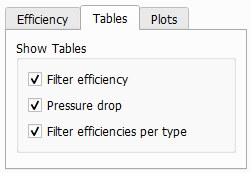
Below, a number of tables are presented, that can be selected under the Tables tab in the post-processing section on the left.
 Filter efficiency
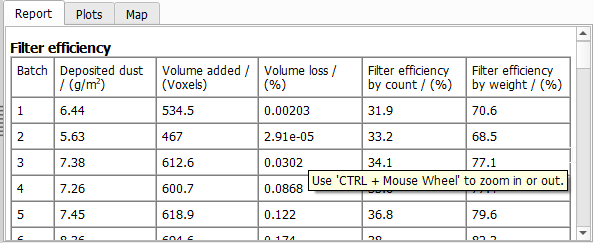
The Filter efficiency table contains, for every batch, the Deposited dust, the Volume added to the material by the deposited particles, the Volume loss, and the Filter efficiency in percentage by count and by weight.
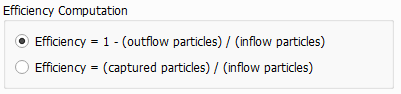
The Efficiency Computation panel allows to select the definition of the filtration efficiency. It can either be based on the number of particles which leave the domain via the outflow region or on the number of particles which are captured. The difference between both definitions is the handling of particles which are still in the domain but are not (yet) marked as captured.
The Volume loss is the particle volume lost during each batch due to the overlapping of particles. This value is a good indicator whether the number of particles per batch has been chosen correctly. If the Volume Loss is too high, the number of particles per batch should be reduced to achieve a sufficient accuracy of the computation.
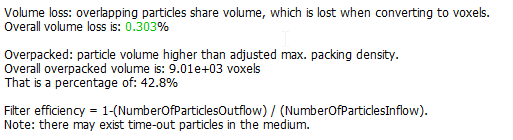
The overall volume loss is reported below the Filter Efficiency table:
For simulation with Unresolved particles, also the number of voxels filled by a higher volume fraction than the defined maximal packing density is reported. If some particles are smaller and some are larger than the voxel length, the number of overpacked voxels is typically very large (all locations where a large particle is deposited are overpacked, because a large particle fills up several voxels completely).
|
Pressure drop
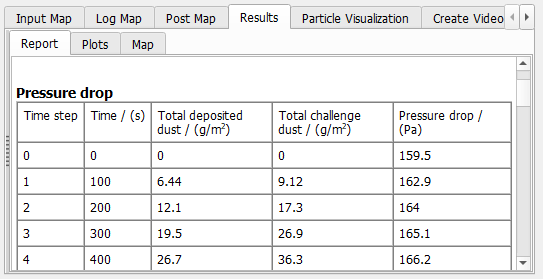
The Pressure drop table contains the Total deposited dust, the Total challenge mass and the Pressure drop for every batch.
|
Filter efficiencies per type
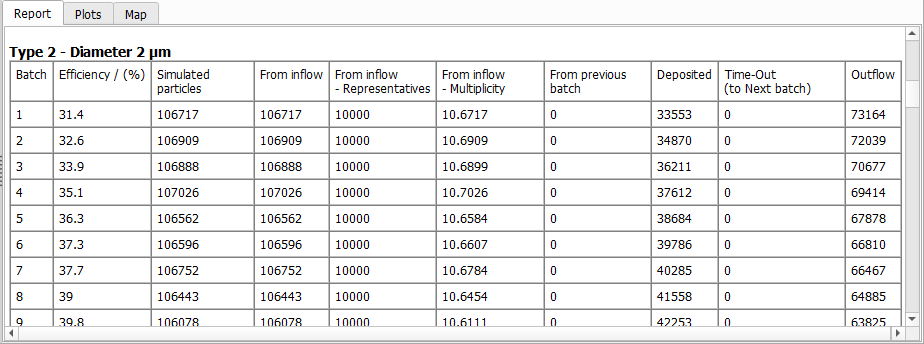
The Filter efficiencies per particle type tables shows the filter Efficiency of a certain particle type for every batch. It shows the overall number of Simulated Particles, consisting of particles entering From Inflow, or continuing movement From Previous Batch.
If Particle Multiplicity was used, particles entering from the inflow area are simulated as representative trajectories with a given multiplicity. The table reports how many From Inflow -Representatives were simulated and the average From Inflow – Multiplicity of those particle trajectories. The multiplicity of a representative trajectory is always an integer value, so a value of 10.67 indicates that there are some representatives with a multiplicity of 10, and others with a multiplicity of 11.
At the end of the batch, particles are either Deposited, are still moving inside of the structure (Time-Out), or have left the domain through the Outflow.
Depending on the choice of parameters, some particles may neither count as Deposited, Time-Out or Outflow, e.g. because they leave the domain through the inflow area. In this case, those particles are removed completely from the reported statistics. Those particles are not included in the number of Simulated Particles and simulated Representatives.
Be aware that a representative particle trajectory starting with a multiplicity of 11, may arrive at the outflow with a multiplicity of 3, and would in this case lead to 8 deposited particles and 3 particles leaving through the outflow.
|
Plots
The available plots are identical to the filter media result plots.