Output
The Output tab allows to select the files stored by the simulation. They can be used afterwards to visualize the corresponding results.
Select one of the predefined selections Keep all, Keep all except trajectories or Keep none, or select Individually set to control which file types you wish to keep.
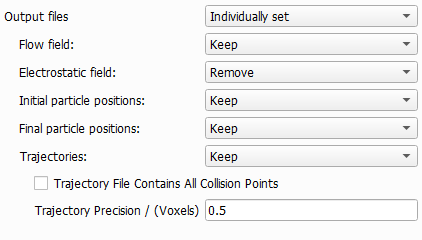
For each file type, you can select to Keep or Remove the files. You have to keep the flow field if you want to visualize the flow (e.g. with streamlines) after the simulation. You have to keep the final particle positions if you want to visualize the deposited particles.
To visualize the movement of particles, you need to keep the Trajectories. Be aware, that these files may become very large if many particles are simulated. You can influence the file size and the precision of the stored trajectories (e.g. the number of points on the particle paths saved in the file) by two additional parameters:
- Check Trajectory File Contains All Collision Points to add all points where a particle touches the surface of a solid object to the trajectory file.
- The value entered as Trajectory Precision determines how accurately the trajectories are stored. The given value determines the traveling distance between two points stored in the trajectory file.
