Fiber Profiles
In the previous section, the profile of the circular fiber types could be described by a single diameter value, or two diameter values for each general segment. In general, for the Infinite, Short, or Curved fiber shapes only a single set of descriptors of a fiber profile are needed.
For the GeneralShort fiber shape, two sets of descriptors are needed, one for the start point of the fiber, and one for the end point of the fiber.
For the GeneralCurved fiber shape, two sets of descriptors are needed for each segment, one for the start point of a segment, and one for the end point of a segment. One fiber may be composed of several segments.
If parameters change from the start to the end of the fiber (or a fiber segment), the parameters are linearly interpolated along the fiber (or the segment). Most interesting is when the perpendicular changes, for example of an elliptical profile. In this case, the fiber is twisted, and the orientation of the fiber profile changes linearly along the fiber (torsion).
In detail, the parameters for the profile types are as follows:
Circular  |
Infinite Short Curved |
A circular profile is defined by one diameter, given by the value after the key Diameter. |
GeneralShort GeneralCurved |
A circular profile is defined by the diameter at the start, given by the value after the key Diameter1, and the diameter at the end, given by the value after the key Diameter2. |
|
Hollow  |
Infinite Short Curved |
A hollow profile is defined by one diameter, given by the value after the key Diameter, and one inner diameter, given by the value after the key InnerDiameter. The inner diameter describes the hollow part in the fiber center. |
GeneralShort GeneralCurved |
A hollow profile is defined by one diameter and one inner diameter at the start, given by the values after the keys Diameter1 and InnerDiameter1, and one diameter and one inner diameter at the end, given by the values after the keys Diameter2 and InnerDiameter2. |
|
Rosetta  |
Infinite Short Curved |
The contour of a Rosetta profile is defined by a circle where an additional sine-oscillation is added. The diameter of the circle is given by the value after the key Diameter and the amplitude of the sine function by the value after the key AmplitudeFraction multiplied by the Diameter. The number of maxima of the sine function is given by the value after the key NumberOfLeaves. The orientation of the profile is defined by the vector after the key Perpendicular. |
GeneralShort GeneralCurved |
The Rosetta profile is defined by one diameter and one sine amplitude at the start, given by the values after the keys Diameter1 and AmplitudeFraction1, and by one diameter and one sine amplitude at the end, given by the values after the keys Diameter2 and AmplitudeFraction2. The orientation at the start is given by the vector after the key Perpendicular1 and the orientation at the end by the vector after the key Perpendicular2. The number of maxima of the sine function is given by the key NumberOfLeaves. |
|
Elliptical  |
Infinite Short Curved |
An elliptical profile is described by two diameters, given by the values after the keys Diameter1 and Diameter2, and a perpendicular, given by the vector after the key Perpendicular. Diameter1 and Diameter2 specify the profile size in the direction of the two main axes of the elliptical profile. The vector after the key Perpendicular is perpendicular to the direction of the fiber and points in the direction of Diameter1. |
GeneralShort GeneralCurved |
An elliptical profile is defined by two diameters at the start, given by the values after the keys Diameter1 and Diameter2, and two diameters at the end, given by the values after the keys Diameter3 and Diameter4. The direction of Diameter1 is given by the vector after the key Perpendicular1 and the direction of Diameter3 by the vector after the key Perpendicular2. When the values for Perpendicular1 and Perpendicular2 are different, the fiber (or segment) is twisted. |
|
Cellulose  |
Infinite Short Curved |
The definition of a cellulose profile is similar to the one for the according elliptical profile. Additionally, it has two inner diameters, specifying the hollow part in the fiber center, given by the values after the keys InnerDiameter1 and InnerDiameter2. InnerDiameter1 points in the direction of Diameter1 and InnerDiameter2 points in the direction of Diameter2. The vector after the key Perpendicular is perpendicular to the direction of the fiber and points in the direction of Diameter1. |
GeneralShort GeneralCurved |
The definition of a cellulose profile is similar to the one for the according elliptical profile. Additionally, it has two inner diameters at the start, given by the values after the keys InnerDiameter1 and InnerDiameter2, and two inner diameters at the end, given by the values after the keys InnerDiameter3 and InnerDiameter4. InnerDiameter1 points in the direction of Diameter1, InnerDiameter2 points in the direction of Diameter2, InnerDiameter3 points in the direction of Diameter3, and InnerDiameter4 points in the direction of Diameter4. The direction of Diameter1 is given by the vector after the key Perpendicular1 and the direction of Diameter3 by the vector after the key Perpendicular2. When the values for Perpendicular1 and Perpendicular2 are different, the fiber (or segment) is twisted. |
|
Rectangular 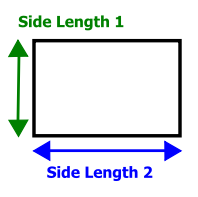 |
Infinite Short Curved |
The shape of a rectangular profile is defined by the two side lengths of a rectangle, given by the values after the keys SideLength1 and SideLength2. The orientation of the profile perpendicular to the fiber direction is given by the vector after the key Perpendicular, were SideLength1 points in the direction of Perpendicular. |
GeneralShort GeneralCurved |
The shape of a rectangular profile is defined by the two side lengths of a rectangle at the start, given by the values after the keys SideLength1 and SideLength2, and the two side lengths at the end, given by the values after the keys SideLength3 and SideLength4. The orientation of SideLength1 perpendicular to the fiber direction is given by the vector after the key Perpendicular1 and the orientation of SideLength3 by the vector after the key Perpendicular2. |
|
Angular  |
Infinite Short Curved |
The angular profile has the contour of a regular polygon enclosed by a circle, where all vertices of the polygon lie on the circle. The circle is defined by a diameter, given by the value after the key Diameter. The number of edges of the polygon is given by the value after the key NumberOfEdges. The orientation of the profile is defined by the vector after the key Perpendicular |
GeneralShort GeneralCurved |
The profile is described by one diameter at the start, given by the value after the key Diameter1, and one diameter at the end, given by the value after the key Diameter2 (the meaning of the diameter is explained for the simple angular profile). The orientation at the start is given by the vector after the key Perpendicular1 and the orientation at the end by the vector after the key Perpendicular2. The number of edges of the angular profile is given by the value after the key NumberOfEdges |
|
Arbitrary  |
Infinite Short Curved |
The profile is described by a comma-separated Radius list and an Angle list. The first listed radius is achieved at an angle of 0°, the following radii are achieved at the given angles. The orientation of the profile is defined by the vector after the key Perpendicular. The Curved fiber shape is not editable in GadGeo and cannot be selected in the Create / Add GAD Objects command. |
GeneralShort GeneralCurved |
The profile at the start is described by Radius1 and Angle1, the profile at the end is described by Radius2 and Angle2. The orientation at the start is given by the vector after the key Perpendicular1 and the orientation at the end by the vector after the key Perpendicular2. The GeneralCurved fiber shape is not editable in GadGeo and cannot be selected in the Create / Add GAD Objects command. |
|
Strut  |
Infinite Short Curved |
The triangular profile is described by the Diameter and an Angle list with two entries. The orientation of the profile is defined by the vector after the key Perpendicular. These fiber shapes are not editable in GadGeo and cannot be selected in the Create / Add GAD Objects command |
GeneralShort GeneralCurved |
The profile at the start is described by Diameter1 and Angle, the profile at the end is described by Diameter2 and Angle. The orientation at the start is given by the vector after the key Perpendicular1 and the orientation at the end by the vector after the key Perpendicular2. |
