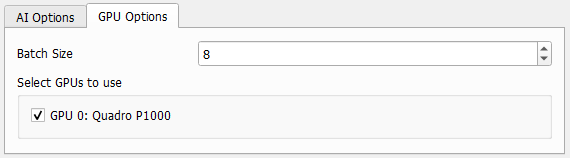
GPU Options
In the GPU Options panel define the parameters for the used graphic card(s).
 Batch Size
The Batch Size is the number of samples, which the neural network uses simultaneously. For example, with the default batch size 4, during applying the network the error is computed, and the result updated for four windows at the same time, before moving on to the next four windows. In literature there is usually a warning about too large values for batch size due to the potential of overfitting, but in 3D image analysis here the batch size is limited by the available GPU memory. If the value is chosen too high, a warning dialog appears, when starting to apply the neural network. It is recommended to set the value as high as possible with the available GPU memory, so that it works without giving an error. This is often a value between 1 and 16 depending on the GPU hardware.
If multiple GPUs are selected, the batches are distributed to equal numbers on the different GPUs.
If the batch size was chosen too large for what is available on the graphics card, an error message appears suggesting to decrease the batch size.

|
Note! For CPU-based computation, the choice of batch size is not critical and can be left at the default.
|
|
Select GPUs to use
If a suitable graphics card is detected during installation of GeoDict, the GPU mode is used for applying the neural network, otherwise it is running in CPU mode.
If multiple GPUs are available, select on which it should run. It can also run on multiple GPUs. If selecting more GPUs than licensed, an error message appears when clicking Run.
|