|
Navigation: GeoDict 2025 - User Guide > Image Analysis > GeoDict-AI > Segment Grayscale Image |
Scroll |
AI Options
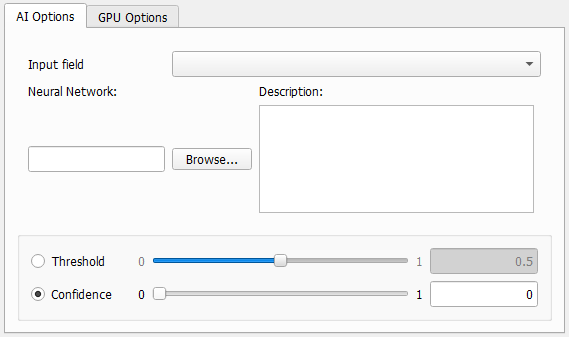
Select one of the currently loaded grayscale images as Input field to enhance from the pull-down menu. Several grayscale images can be loaded at the same time by checking Keep existing Volume Fields in the Loading volume file dialog, when loading the image with File - Load Volume File. Using ImportGeo-Vol also different volume fields can be loaded. Then, select the Input field to segment from the pull-down menu. |
 Neural Network and Description
Browse for the neural network trained with Train Neural Network and most suitable for the image under consideration. For this, under Neural Network click Browse. Select a neural network *.gnn file, for example the BestModel.gnn from a prior training. 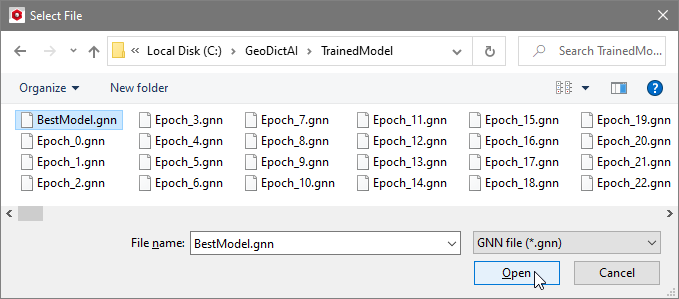 In the Description, the current constraints for the application of the neural network are listed, as entered in the Train Neural Network dialog, e.g. the diameter range of the fibers the neural network was trained for. |
The Threshold is an internal (or expert) parameter that is mostly applied by proficient users at Math2Market. The parameter is only available if the chosen network is trained to differentiate between two material phases. It is used for the decision whether a voxel is a target material voxel or not. If the identified features are over segmented, choosing a smaller threshold can lead to better results.  Find a visualization of the confidence field (*.npz) and threshold here.
|

Specify the minimum required confidence to select a class for a voxel. The material to analyze should be split into different materials by the neural network. For each of the resulting materials a confidence field is computed. These fields contain values between 0 and 1, where 1 means, the neural network is perfectly sure, that this voxel should be assigned to the corresponding class and 0 means it is definitely not the corresponding class. If none of these fields has a higher probability value than specified the material will be set to uncertain in these locations and material ID 255 is assigned. The values of the confidence fields of all classes sum up to 1. Thus, not all confidence values can be smaller than 1/n, where n is the number of classes. That is why setting the Confidence value below 1/n will not have any impact. An example is shown here. |
©2025 created by Math2Market GmbH / Imprint / Privacy Policy
