Shear
The Shear tool allows you to correct sheared volumes, occurring for example in FIB-SEM images.
For Shear Axis choose the shear direction and the coordinate that the Shear Angle is based on.
Click Apply to shear the structure with the current settings.
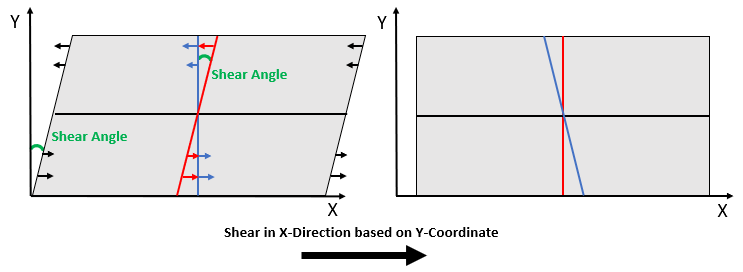
By Shearing the image, each voxel in shear direction (defined via the Shear Axis) is displaced upon consideration of the Shear Angle.
The figure below schematically describes the handling of a sheared image. Here, the image is sheared in X-direction resulting in a parallelogram.
- To correct the image (into a rectangle), this direction must be defined in Shear Axis as “Shear in X-Direction based on Y-Coordinate”.
- Then, the Shear Angle must be determined. Upon entering an angle, a yellow line appears in the according 2D slice, which will be the new “center line” after clicking Apply.
Gray values are moved as indicated by the arrow lengths below. To learn more about the applied method refer to shear mapping on Wikipedia.
In the following example, the gray value image needs to be sheared in Z-direction based on Y-coordinate. The Shear Angle is set to 5°. As Shear is selected for Overlay the resulting center line is visualized with a yellow line.
