Solid Size Distribution (Granulometry)
The Solid Size Distribution (Granulometry) is determined by fitting spheres into the solid objects. To be more precise, a point belongs to a solid object of a diameter larger or equal than d, if it is inside any sphere of diameter d, which can be fitted into the solid objects.
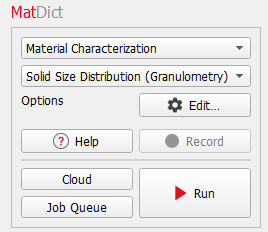
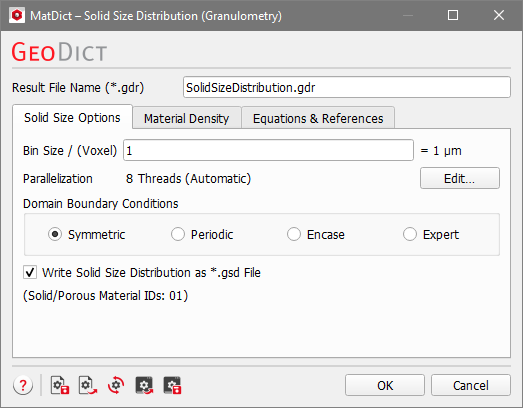
After selecting Solid Size Distribution (Granulometry), the needed parameters can be entered by clicking the Edit… button. The Solid Size Distribution dialog includes the Solid Size Options and the Material Density tabs. The last tab, Equations & References, provides further information about the underlying algorithm and cites J. Becker, A.Wiegmann, T. Saito, and D. Silin.
At the top of the dialog, enter the Result File Name. The result file is saved in the chosen project folder (File → Choose Project Folder in the menu bar).
Solid Size Options
The Solid Size Options are similar to those of PoroDict’s Pore Size Distribution (Granulometry).
 Bin Size
Enter the Bin Size in units of voxels. The equivalent in metric length units is shown on the right. The bin size determines the range of diameters that belong to one class.
|
Parallelization
Control how many threads are used for the computation. Parallelization is possible if your license and hardware allow it. The Parallelization Options dialog opens when clicking the Edit button, to choose between Sequential, Parallel (Shared Memory) or Automatic Number of Threads.
Selecting Sequential will not apply parallelization.
When Parallel (Shared Memory) is selected, the Number of Threads can be entered. Below, the maximum number of available threads and the maximum number of licensed parallel processes is shown in the dialog.
If Automatic Number of Threads is selected, the number of parallel processes is automatically selected for optimal speed, based on the CPU cores and licensed parallel processes.
For up to eight Available Threads, all of them will be used. If more than eight threads are available, two cases might occur.
- The number of Available Threads is larger (or equal) than the Number of CPU Cores:
- Then the maximum of eight and Number of CPU Cores divided by 2 is used.
- The number of Available Threads is smaller than the Number of CPU Cores:
- Then the maximum of eight and number of Available Threads divided by 2 is used.
|
Domain Boundary Conditions
The Domain Boundary Conditions can be chosen to be Symmetric, Periodic, Encase, or any combinations of those boundary conditions in all three directions with the choice of Expert.
Choosing the appropriate boundary condition depends on the structure’s design.
For example, imagine a structure with a cross-section as shown below.

For the three boundary condition options the resulting pore size is visualized in blue.
- If Symmetric boundary conditions are taken, the geometry is mirrored at the domain boundary.

- If instead the expected pattern of the geometry is repeated in all directions, Periodic boundary conditions should be selected. That has the effect that the objects and pores of the structure that end on one side of the structure reappear on the opposite side.

- If the structure should be encased with a closed wall, the Encase boundary conditions are used.

Check Expert to apply different boundary conditions for each direction. You can combine the three above mentioned boundary conditions independently for the directions. For example, the boundary conditions could be chosen to be Encase in X-direction, Symmetric in the Y-direction and Periodic in Z-direction.
|
Write Solid Size Distribution as *.gsd File
When Write Solid Size Distribution as *.gsd File is checked, a file with the default name SolidSizeDistribution.gsd, in *.gsd (GeoDict Size Distribution) format, is saved in the results folder inside the project folder. The file contains the solid size (diameter of sphere) of each voxel written into a volume field that can be loaded in the Solid Size Visualization tab of the Result Viewer.
|
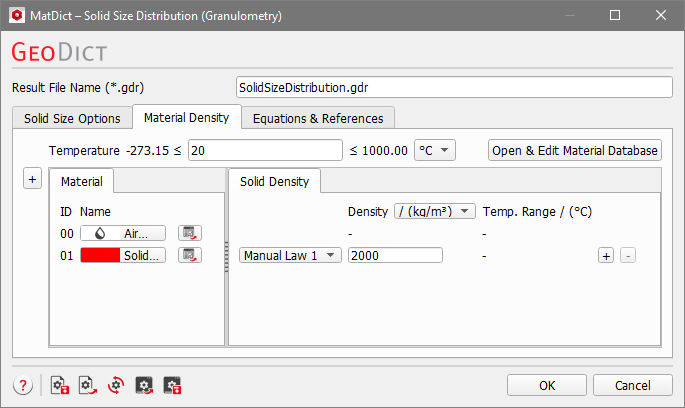
Material Density
Under the Material Density tab, the temperature can be edited if the density of a material is temperature dependent. Additionally, the density of every solid material in the structure must be specified in this tab. The density can be given in kg/m3 or g/cm3. For materials from the GeoDict Material Database, the density value is entered automatically. If a material is set to Manual, the Material Law changes to Manual Law and more laws can be added or deleted by clicking the “+” or “-“ button on the right of the corresponding row. You can enter the density for manual materials directly in the Solid Density tab.