Results of Identify Pores
In Identify Pores, an ellipsoid is fitted into each identified pore.
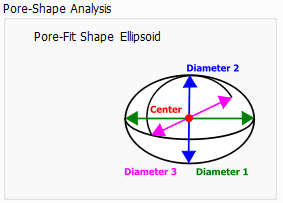
To define such an ellipsoid, a center point and three diameters are needed.
In the following, we set
- to be the length of the longest of the three diameters,
- to be the length of the medium diameter,
- to be the length of the shortest diameter.
A pair of diameters is similar if its size ratio (the smaller diameter is divided by the larger diameter) is larger than 0.875. Two diameters differ, if their ratio is smaller than 0.875.
Four shapes for the ellipsoids can be fitted into the pore:
- An ellipsoid is formed as a Flat Bar, if all three diameters , , and differ much from each other.
- A Prolate Spheroid has one bigger diameter, , and the two smaller diameters, and , are similar to each other. Its shape is similar to a cigar.
- The two bigger diameters ( and ) of an Oblate Spheroid are similar. Thus, it can be compared to a disk.
- For a Sphere all three diameters , , and are similar.
The parameters of these ellipsoids are used to compute further pore parameters. We show the parameters graphically with the help of a simple structure, that contains one ellipsoidal pore in the center of the structure. It was created by placing an ellipsoid with dimensions 50 µm x 30 µm x 40 µm in the center of an empty domain with voxel length 1 µm and then inverting the structure.
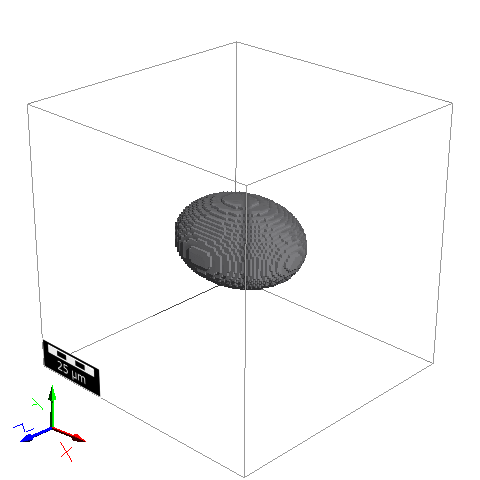
- Volume: The volume of the pore is simply determined by the number of voxels the pore contains. To get a volume in metrical units, it is multiplied by the cubed voxel length:
In the example, the pore consists of 31384 voxels, so that the pore volume is 31384 µm3.
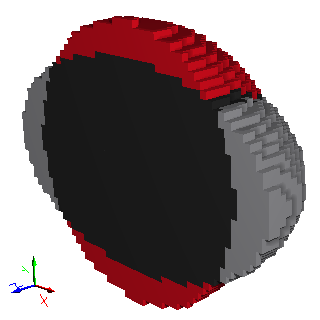
- Equivalent Diameter: The equivalent diameter is the diameter of the sphere which has the same volume as the pore. On the right, the volume equivalent sphere for the example (which has a diameter of 39 µm) is shown in red and was added to the initial ellipsoid using the Add command of LayerGeo. The black part represents the overlap.
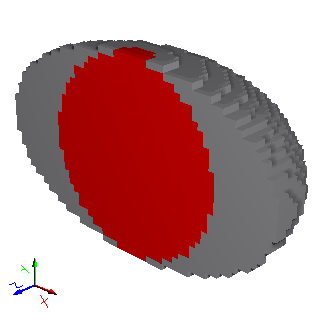
- Inner Diameter: The inner diameter is the diameter of the largest sphere that can be inscribed into the pore. Below, the inscribed sphere for the example, which has a diameter of 30 µm, is shown in red and was added to the ellipsoid structure with LayerGeo.
|
Important! Note that the Inner Diameter is only calculated if the option Save Inscribed-Sphere Diameters and Sheppard Sphericities was checked in the Output Options of the pore-identification options. |

- Shortest Fit Diameter: This is the shortest diameter () of the ellipsoid fitted into the pore. For the example, the shortest diameter is 30 µm.
- Intermediate Fit Diameter: This is the intermediate diameter () of the ellipsoid fitted into the pore. For the example, the intermediate diameter is 40 µm.
- Longest Fit Diameter: This is the longest diameter () of the ellipsoid fitted into the pore. For the example, the longest diameter is 50 µm.
- Perimeter: The computed perimeter is the shortest perimeter around the ellipsoid fitted into the pore. As an ellipsoid is defined by three diameters, the perimeter is computed as the perimeter of the ellipse formed from the two smallest of those three diameters. For the example structure the perimeter would be the length of the black line, which is 110 µm.
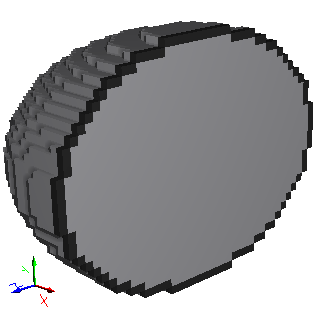
- Krumbein Sphericity: The Krumbein Sphericity is a measure for the sphericity of the pore, based on the three principal axes (, , ) of the fitted ellipsoid. If the Krumbein Sphericity is close to 1, the ellipsoid is nearly a sphere. In the example above, the Krumbein Sphericity is 0.78, which means that the diameters differ much.
- Sheppard Sphericity: The Sheppard Sphericity is defined as the diameter of the inscribed sphere divided by the diameter of the volume-equivalent sphere. For the example, the Sheppard Sphericity of the pore is 0.76.
|
Important! Note that the Sheppard Sphericity is only calculated if the option Save Inscribed-Sphere Diameters and Sheppard Sphericities was checked in the Output Options of the pore-identification options. |
- Aspect Ratio: The ellipsoid fitted into the pore is defined by three diameters. The aspect ratio is computed as
where the shortest diameter is divided by the largest diameter , which is 0.6 for the example.
- Surface Area: The surface of the pore is estimated by an algorithm based on MatDict’s Estimate Surface Area command (see also J. Ohser, F. Mücklich). The Area (or Surface) Probability is defined by computing the surface area of each segmented pore (using the same algorithm as in MatDict’s Estimate Surface Area command) and then weighting the pore by that value. The computed surface area does also include the surface between different pore, not only the area between pore and solid material. For the example, the surface is 4985 µm2.
- Surface-to-Volume Ratio: The estimated surface area of the pore is divided by the volume of the pore. For the example a value of 0.159 is obtained.
- Surface Smoothness: This is the surface of the fitted ellipsoid divided by the estimated surface of the pore. Usually, the estimated pore surface is larger than the surface of the fitted ellipsoid. Hence, the surface smoothness is usually below 1. Only if the shape of the pore is very similar to the fitted shape, then the surface estimation might be a little smaller than the surface of the fitted ellipsoid. The latter is the case in the example, where the surface smoothness is 1.002.
- Cut-Surface Ratio: The Cut-Surface Ratio measures how much of the pore surface is part of the domain boundary. The interface of the pore with the domain boundary is the Cut Surface, which is then divided by the remaining surface of the pore. Thus, it is a measure for the quality of boundary pore. For example, a Cut-Surface Ratio of 1 means that the interface of the pore with the domain boundary is as large as the remaining surface of the pore. In the example, the pore has no boundary contacts and thus the cut surface area and the cut-surface ratio are both 0.
|
Important! Note that the domain boundaries, that were set to be periodic, do not contribute to the interface of the pore with the domain boundary. Particularly, if all domain boundaries are set to be periodic, the cut-surface ratio will always be zero. Also, if Remove Pore Fragments at Domain Boundary was activated, then the cut surface ratio is zero, too, because there will be no pore left that have an interface with the domain boundaries. |
- Mass: If a density is assigned to the analyzed material, each pore has a mass which can be calculated from its volume.
- Moment of Inertia: It depends on the mass distribution of the pore and is only computed if a density is assigned.
- Coordination Number: This is the number of contacts of a pore to other pores. In the example the coordination number is 0 as only one pore exists.
