Wetting Parameters
The Wetting Parameters tab is divided into three panels: Phase Distribution, Saturarion Steps, and Flow Phase.
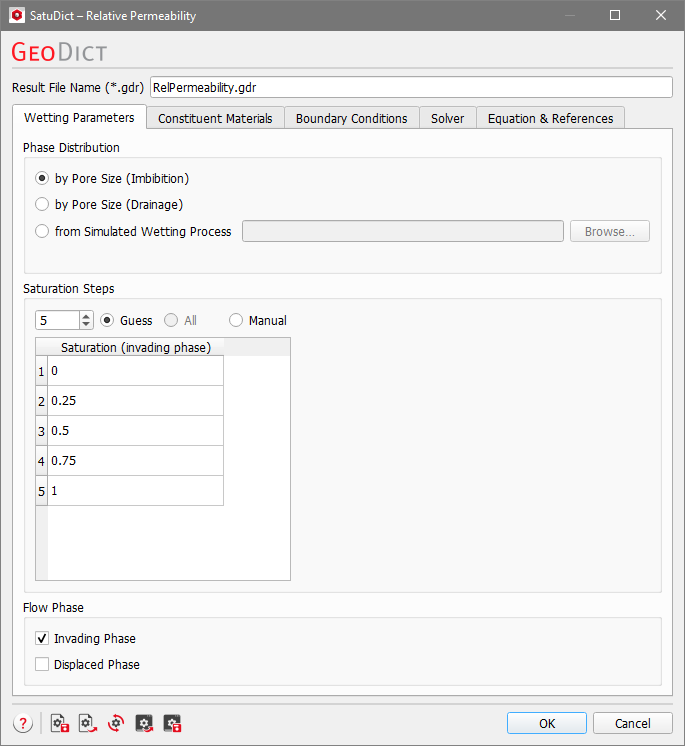
Phase Distribution
The calculation of phase distribution can be based on the pore size alone (by Pore Size (Imbibition) or by Pore Size (Drainage)), corresponding to a saturation experiment with Invading Fluid must be connected to a Reservoir unchecked. The same calculation as for the capillary pressure command is performed, but without a connectivity check. Only the pore sizes are considered. For by Pore Size (Imbibition) a contact angle of 0° for the invading fluid is assumed. When choosing by Pore Size (Drainage), the invading fluid contact angle is assumed to be 180°.
However, the phase or fluid distribution at different saturation points can be taken from a previously simulated imbibition or drainage process. Select from Simulated Wetting Process and click Browse... to choose a result file (GDR file) in your project folder.
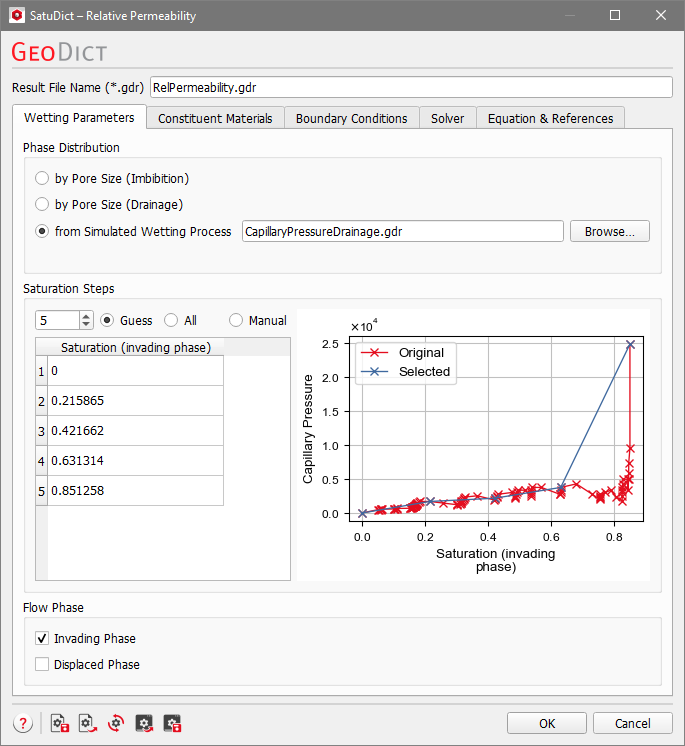
Saturation Steps
The permeability is calculated at different saturation steps of the invading fluid. In the Saturation (invading phase) table the chosen steps are shown or can be edited. There are three different modes to select the saturations:

Flow Phase
In the Flow Phase panel, choose the phase (Invading Phase and/or Displaced Phase) for which the Relative Permeability is to be calculated.
