Layered Materials
Layered Materials is designed to simulate the acoustic absorption of a stack of material layers chosen by the user.
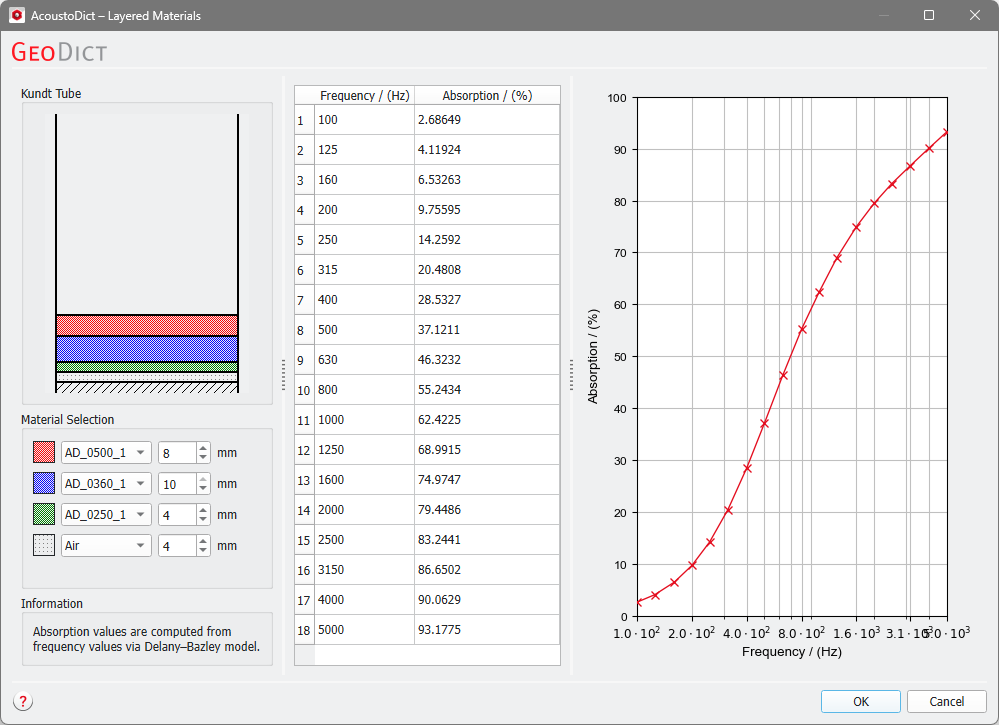
Click Stack… to open the dialog box. On the left, the Kundt Tube panel shows a cross-section schematic drawing of a virtual impedance tube for the measurement of the absorption coefficient of materials. The heavy backing plate is shown at the bottom as a block of slanted stripes.
Under the Material Selection panel, select materials from the AcoustoDict database using the pull-down menus. Stacks of up to four different materials can be constructed. All materials in the database are available, as well as Air to allow for air gaps in the stacked multilayer construction.
A color is assigned to every material (or air) layer and the thickness of the layer can be directly entered or selected through the up-down arrows. If the multilayer construction should have less than four layers, unused layers can be set to Air and 0 mm.
While the layers are being stacked, the predicted acoustic absorption values of the multilayer stack at various frequencies are already listed in the table and the frequency/absorption curve for the complete multilayer construction is displayed on the right.
Countless variations of the multilayer construction can be built in real time.
The computation of the acoustic surface impedance follows equations (71) - (73)
