Open Scripting Tutorials
Clicking Open Scripting Tutorials in the macro menu or unfolding Macro & Scripting Tutorials in the Macro Execution Control shows a list of preinstalled macro tutorials.
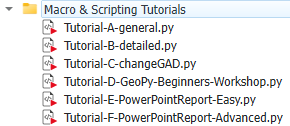
The tutorial macros A, B, C and E need only a GeoDict Base license for execution. The tutorials D and F also need the modules FiberGeo and FlowDict and are the macros created in the workshop videos available on the Math2Market YouTube channel. Find the corresponding links in the macros by opening them in a text editor clicking Edit. There, you can also find detailed explanations for all steps.
More advanced example macros can be found in the subfolder Python Scripting Examples. These Python scripts also use other GeoDict modules.
All tutorials have detailed descriptions and thus can be very helpful for getting started with editing Python macros. When selecting one of the available macros, the description area displays a report about the macro. In the macro, this report content can be found between the triple apostrophes after Description = ''' ''', and can be edited at any time after opening the macro with a text editor.
For the Tutorial-A-general.py macro, the text in the macro and in the description area are shown here.
