Positioning
Particle Initial Position
First, select whether the particles should be created according to the given size distribution or loaded from a file. If particles are loaded from a file, number and size of particles are as given in the file.
Select Create Particles and determine the Particle Start Position, the Particle Positioning Weights, the Particle Start Velocity, and the Number of Particles per Type to define the initial set of particles.
Select Load Particles from File and Browse... for a .gpp file to load.
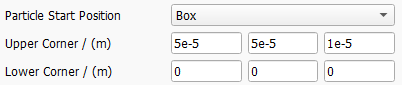
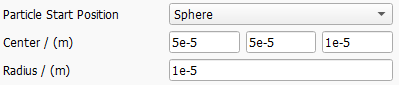
Particle Start Position
Select one of the following Particle Start Position types. The default start position is the Inflow Plane.


Particle Positioning Weights
Particle start positions are scattered randomly inside the defined Particle Start Position area or volume.
By default, those positions are uniformly distributed. Be aware that a spatially Uniform placement in the inlet will lead to an increased particle concentration in areas with low fluid velocity, e.g., in proximity to a surface or a walls.
If Velocity is selected, the starting probability is based on the local fluid velocity. Selecting this option will lead to a uniform particle concentration in the inflow.
If Distance is selected, the starting probabiliy is based on the distance from the next solid object. This will lead to higher particle numbers in the core flow, while there will be less particles starting next to the surface.
With GivenField, it is possible to load an arbitrary 3D field of scalar values to define the starting probability. For example, it is possible to load the flow field of a previous computation and select the velocity or one of its components.

Particle Start Velocity
Select either Fluid Velocity (the default option, which was used until GeoDict 2025) or Given Velocity as the Particle Start Velocity.

With the first option, particles begin moving with the fluid velocity at their start position.

With the second option, all particles start with the same user-defined velocity.
Number of Particles per Type
The Number of Particles per Type defines how many particles are simulated for each given particle type/particle size. Larger numbers lead to more accurate results, but also to longer runtimes of the simulation. For each particle size, FilterDict tracks the paths of this number of particles and calculates the fractional filter efficiencies from the results.
To determine the overall efficiency from the fractional efficiencies, the percentages entered in the particle size distribution tab are taken into account.
Random Seed
Particles to be filtered are placed randomly in the area according to the selected Particle Start Position. The parameter Random Seed controls the underlying random number generator. The same random seed produces identical results, whereas results with different random seeds are similar but not identical.
If the results generated by different random seeds are considerably different, increase the Number of Particles per Type.
Reflect Particles at Inflow Plane
If diffusion through Brownian motion is simulated, some particles might diffuse against the flow direction, reach the inflow region and exit the domain. Check Reflect particles at inflow plane to avoid the exit of such particles.
Particle End Position
Particles reaching the outflow plane are always considered as unfiltered.
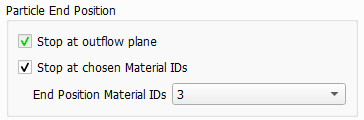
Similarly to the definition of the particle start position, an additional area can be marked. Particles that arrive in this area will also stop moving and be counted as unfiltered.
