Constituent Materials
For the flow solver's computation, the materials in the structure and the fluids flowing through it need to be defined under the Constituent Materials tab, so that their physical properties parameters are taken into account.
To set the fluid flowing through all pore and porous materials, click Set all Fluids to and select it from the pull-down menu.
If one of the predefined fluids is used, the values for Density, Dynamic Viscosity, and Kinematic Viscosity are taken from the GeoDict Material Database. They are dependent on the given Temperature value and the Chosen Material Law. If Manual is selected, these values can be entered manually.
Any values entered manually, e.g., for a special type of oil, can also be added to the material database through the Open & Edit Material Database button. Additionally, different properties for the same material can be saved as different Material Laws and can then be selected from the pull-down menu in the Set all Fluids to dialog. Material Law 1 is the default shipped with GeoDict. Click here for more information on editing, expanding, and using the GeoDict Material Database.
The Temperature is selectable in Kelvin (K), Celsius (°C), and Fahrenheit (F), and has a default value of 293.15 K (20.0°C, 68 F).
Under the Material subtab, select the fluid used in the simulation from the Use pull-down menu. If other fluids are contained in the structure, they will be treated as immobile (solid) during the simulation. If the structure contains no fluid material, No fluid in geometry is displayed in the top of the Material tab. Select a material for the pore phase by clicking on the corresponding material button.
The density and the dynamic viscosity of this fluid, at the selected temperature, is shown under the Fluid Density/Viscosity subtab.
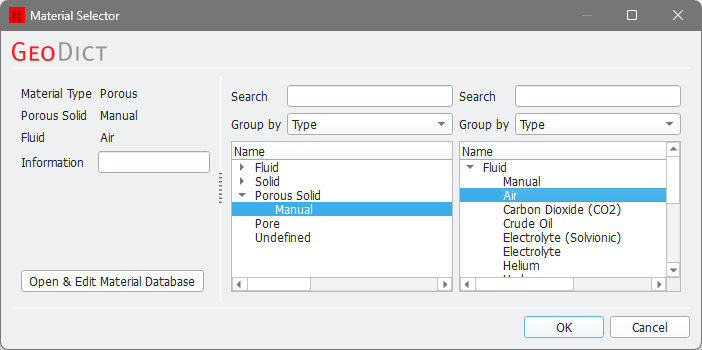
The Material subtab shows also the material IDs assigned to the materials (00, 01, 02, etc.). For each material ID, you can open the Material Selector dialog and select a material by clicking on the corresponding material buttons.
Click the Material Report button to see the relevant parameters for the material with a selected ID.
Fluid flow can happen in pores and porous materials, but not in solid materials. The check sign next to the Material Report icon marks all materials in which flow happens.
For porous voxels, set the Material Type (in the Material Selector dialog) to Porous and choose the fluid that occupies the pores.
The permeability of porous voxels is set under the Permeability subtab. You can define if the material is isotropic (same permeability in all flow directions) or anisotropic (permeability depends on flow direction). When the material is isotropic, the permeability entered in the X-direction is used in all directions. For an anisotropic material, the permeabilities in the three Cartesian directions are needed.
The local orientation of porous materials with anisotropic properties is not considered. You must select the SimpleFFT solver if anisotropic permeabilities are entered.
