Report
The Report tab under the Results tab shows the computed results. Here the Volume flow rate (you can change the unit in the post-processing panel on the left), the Average flow velocity, and the Pressure at inlet/outlet is given. When only one outlet material ID is defined the Pressure difference between inlet and outlet is also provided. If several IDs are defined as outlet, the results are shown for each outlet material ID.
Information about the convergence of the iterative solver is also displayed: Threads, Iterations, Number of cells, Runtime, Memory usage, and the applied Stopping criterion.
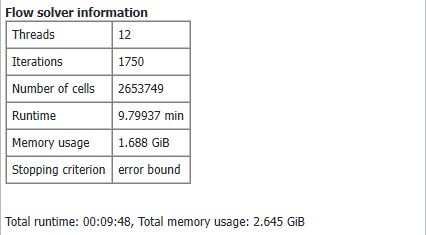
In the last line the Total runtime and Total memory usage are given. Here not only the resources used by the solver are taken into account but also writing volume fields and structure files or already loaded volume fields from previous simulations.
