Cross-Flow Filtration
The Cross-Flow Filtration GeoApp allows to set up a filtration simulation with one inlet, but with two outlets which have different outlet pressures. In contrast to the Cross Flow command, the app also simulates particle movement and deposition.
|
Modules needed to run this GeoApp: FilterDict, FilterDict-Element |

Most of the parameters used are directly loaded from the Complete Filter - Filter Lifetime dialog or a corresponding settings file (*.gps). Therefore, in a first step, select Complete Filter - Filter Lifetime, open the Complete Filter Lifetime dialog and setup the simulation parameters.
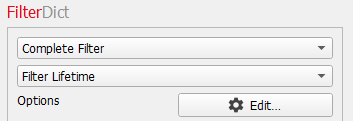
The settings defined in the Complete Filter - Filter Lifetime dialog are part of the calculation setup of Cross-Flow Filtration GeoApp if you choose to use the current settings. Any changes made during other computations may affect subsequent runs of the Cross-Flow Filtration GeoApp. Therefore, unless you are certain that the current configuration is intended, we recommend saving the settings as a *.gps file.
Store the dialog settings in a *.gps file by using the dialog icon. Then close the dialog and return to the Cross-Flow Filtration GeoApp.
The additional settings for the cross-flow filtration simulation can be defined by clicking the Edit… button.
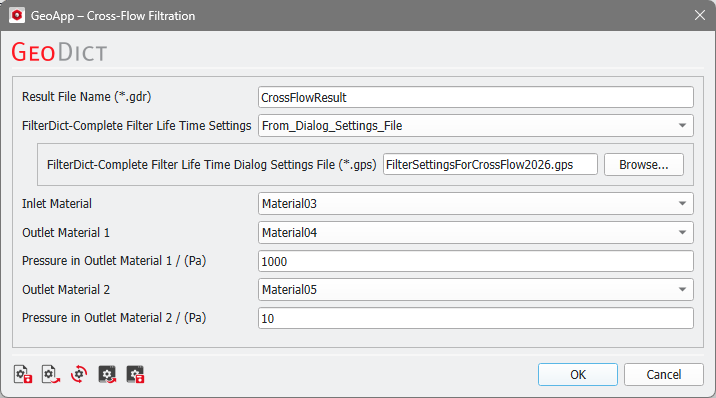
At first, choose a Result File Name.
Then, select if the parameters should be taken from the Complete Filter - Filter Lifetime dialog (select From_Current_Settings) or from a stored settings file (select From_Dialog_Settings_File).
Now, the only additional selections that must be made are to define the feed Inlet Material, the retentate and permeate Outlet Materials and the Pressure in Outlet Materials. Two outlets, Outlet Material 1 and Outlet Material 2, and their corresponding pressures, Pressure in Outlet Material 1 and Pressure in Outlet Material 2, can be defined. After these selections are made, close the dialog and click Run to start the simulation.
