Material Dissolution
The Material Dissolution GeoApp dissolves a structure. Material is removed step by step until everything has dissolved.
|
Modules needed to run this GeoApp: GeoDict Base |

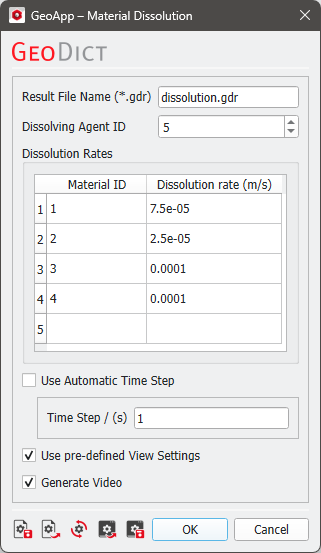
Select a Result File Name fitting to the current project.
The Dissolving Agent ID defines the material that will dissolve the other solid materials in the structure.
Define a Dissolution Rate for each solid material. This denotes the dissolution speed of each material in m/s.
Select the Use Automatic Time Step option to automatically select the smallest possible time step, based on the given dissolution rates. Disabling this option requires you to manually define a Time Step for each time batch.
Select the Use pre-defined View Settings option to set pre-defined camera and clipping settings for generating images. If this option is deactivated, the images will use the current view settings.
Select the Generate Video option to create a video detailing the dissolution progress from the saved image of each time step.
Results
Once the Material Dissolution simulation is complete, the corresponding result file will open automatically in the Result Viewer. The results folder contains intermediate/partially dissolved structures, generated images and video (if selected), and the input structure.
The Report tab displays the time at which dissolution finished at the top. Below, you will find tables showing the dissolved volume per time step for the overall structure and for each solid material ID.
Under the Plots tab, you will find a plot showing the dissolved volume of each solid material ID over time.
From the Data Visualization tab, you can load intermediate structures with partial dissolution.
If selected, the generated video can be found in the results folder. Below is a video showing the dissolution of a tablet containing herbal active ingredients that combat inflammation of the paranasal sinuses: