Porous Plate Capillary Pressure
The Porous Plate Capillary Pressure GeoApp fills the pore space of the current structure with water. Then, air invades the structure from all but one side. The face in Z- direction is connected to a porous plate. The Porous Plate Capillary Pressure app is similar to the MICP command, but here air displaces water.
|
Modules needed to run this GeoApp: SatuDict |

Click Edit to open the Porous Plate Capillary Pressure Parameters dialog.
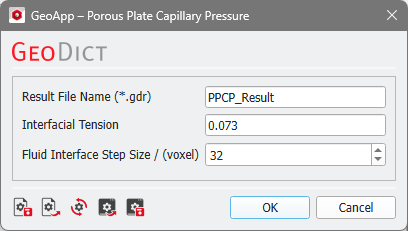
Enter the Result File Name for the generated GeoDict result file (*.gdr) and the corresponding result folder.
Two parameters can be defined:
- Set the Interfacial Tension in N/m between water and air. The given default value refers to the value at 20°C for an air contact angle of 140°. The air contact angle cannot be changed.
- The Fluid Interface Step Size determines the range of voxels that can be maximally saturated within one pressure step. Lower values might increase the runtime and the number of saturation steps significantly, but give a more realistic development of the saturation process.
Click Run to perform the porous plate capillary pressure simulation. The pore space is filled with water, then air invades the structure from all sides except for Z-.
Results
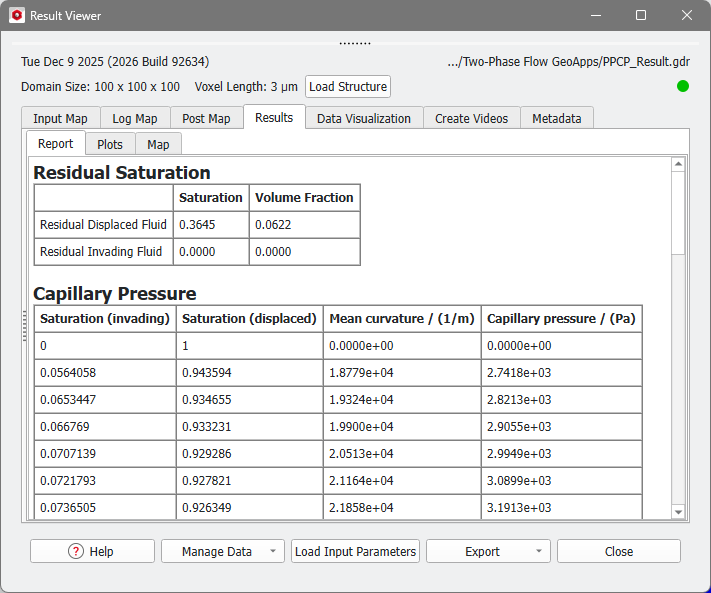
After the simulation is finished, the result file is opened in the Result Viewer. Refer to the Capillary Pressure Curve Results chapter for more details regarding the results.