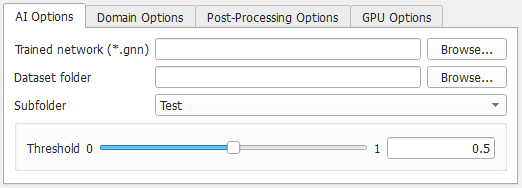
AI Options
Select which neural network should run on which data.
 Trained Network
Browse for the Trained Network (*.gnn) to validate. Select the BestModel.gnn generated with Train Neural Network.
|
Dataset Folder
Choose the Dataset Folder created with Create Training Data containing the corresponding training data in the two folders Train and Test.
|
Subfolder
Select the Subfolder that should be used for validation:
- Train contains the data that was used for training. The neural network should perform well on this data, as it was explicitly trained for this.
- Test contains the data produced explicitly for the validation. This was not used in training and contains different data with similar statistical properties. If the network also performs well on this data, it can be applied on real scans with the required properties.
|
Threshold
The Threshold allows proficient users to influence the decision to which material class a voxel belongs. The parameter is only available if the chosen network is trained to differentiate between exactly two material phases or to identify fibers. For three or more material phases this parameter cannot be used.
If the identified features are over segmented, choosing a smaller threshold can lead to better results. For this, the confidence field (*.npz) can be loaded, without running the complete identification process again.
Find a visualization of the confidence field (*.npz) and threshold here.
For most applications, however, the default values can be kept because the default threshold of 0.5 usually produces good results for a well-trained network.

|
Important! This parameter only has an impact on two-channel results, i.e., distinguishing between only two material phases.
|
|