Parallelization Options
GeoDict commands can use parallelization as a method to speed-up computational processes. For those commands, you can choose how many parallel processes should be used for the parallelization in the command's Options dialog.


|
Know how! The parallelization of a solver can use three different technical methods:
- Local-MPI parallelization,
- Distributed-MPI parallelization, and
- Local-Thread parallelization.
MPI stands for Message Passing Interface and is a standardized and portable message-passing standard designed by a group of researchers from academia and industry to function on a wide variety of parallel computing architectures. Solvers that use MPI are started multiple times as different instances. Each instance performs a simulation on a sub-volume of the whole structure. MPI is used to send data of intermediate results between the running instances. Local-MPI parallelization works within the same computer while Distributed-MPI works across different computers. When Local-MPI is used data can be exchanged very efficiently while Distributed-MPI has to use Ethernet or fast interconnection like InfiniBand to send data between different computers.
Local-thread parallel solvers are started only once per simulation. Thus, no data has to be exchanged between different instances. But these solvers cannot use multiple compute nodes of a cluster to distribute the simulation data.
|
Click on the Parallelization's Edit... button to open the Parallelization Options dialog. In this dialog, you can select between up to four different modes:
 Sequential
When Sequential is selected, no further parameters are needed, and the solver runs sequential without parallelization. This option can be useful for very small structures.
|
Parallel (Shared Memory)
When Parallel (Shared Memory) is selected, the Number of Processes can be entered. Then the maximum number of available processors and the maximum number of licensed parallel processes is shown in the dialog. The solver runs parallel with the specified number of processes / threads.
Depending on the implementation of the specific solver, the parallelization might use the MPI Message Passing Interface or use local thread parallelization. The method is denoted on the panel and automatically selected by GeoDict. Make sure that MPI is installed if the solver uses this method for parallelization.

|
Note! The Parallel (Shared Memory) parallelization option of the EJ and SimpleFFT solvers does not work on cluster nodes. Here, you will get the error message “-1815 Invalid parent process ID”. Use the Cluster parallelization option instead of Parallel (Shared Memory) even if just one node is used for the computation.
|
|
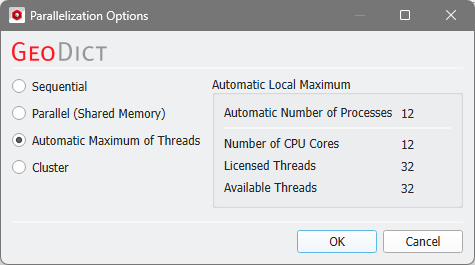
Automatic Maximum of Threads
If Automatic Maximum of Threads is selected, the number of parallel processes is automatically selected for optimal speed, based on the CPU cores and licensed parallel processes. This is the default option and in most cases the best choice.
|
Cluster
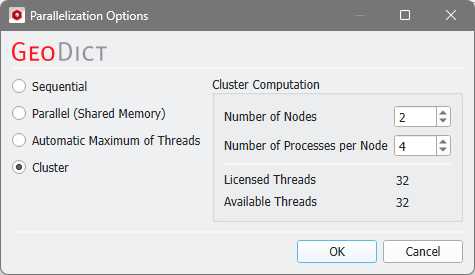
The choice of Cluster is for users of Linux clusters. Use this option to set up a cluster simulation script. Enter the number of compute nodes and the number of processes per node here.
.
Cluster parallelization requires that the solver supports the MPI parallelization method. Otherwise, this option is not selectable in the dialog. The following table shows the supported parallelization methods:
Solver
|
Parallelization method
|
MPI Parallel
|
Thread Parallel
|
EJ solver
|

|

|
SimpleFFT solver
|
|
|
LIR solver
|
|
|
FeelMath solver
|
|
|
Particle tracker
|
|
|
BEST solver
|
|
|
Transport solver
|
|
|
|