Options
After clicking the Edit… button, the Structure Information dialog opens. At the top of the dialog, you can change the default Result File Name by a name according to your current project. The result file is saved in the chosen project folder (File → Choose Project Folder in the menu bar).
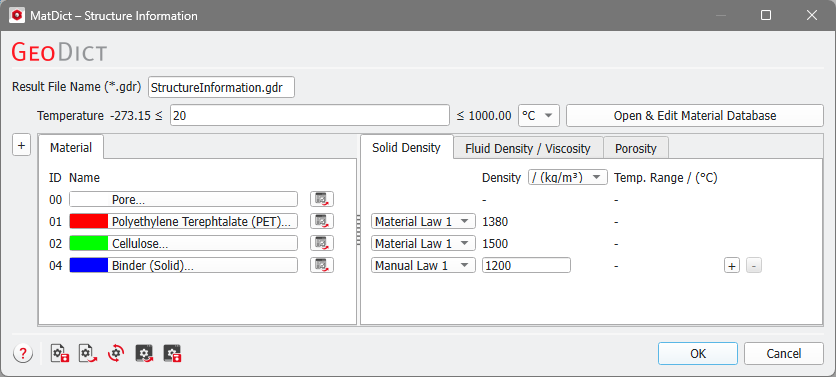
The given Temperature value and the Temp. Range are only of importance if the solid density is defined as a temperature-dependent quantity in the GeoDict Material Database. You can get direct access to the Material Database by clicking the Open & Edit Material Database button. For example, if Aluminum would be chosen as material, the solid density would be temperature dependent. In the above example, the densities of the PET and cellulose fibers are not temperature dependent.

Underneath, on the left side, the Material panel contains the Material IDs of the constituent materials present in the current structure. By default, Material IDs that are not present in the structure are not displayed under the Material tab, but they can be displayed by clicking on the “+” symbol to the left of the Material tab.
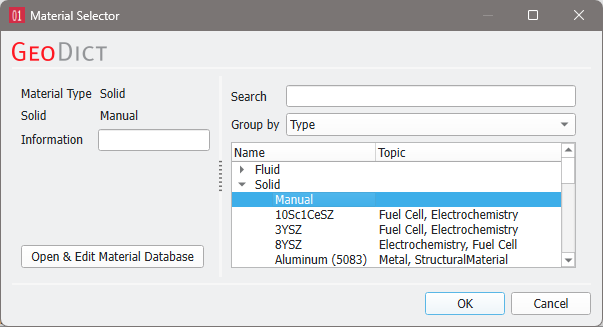
 How to change the constituent materials
On the right, the Solid Density tab contains the density information of the materials for each of the present Material IDs. The density can be given in kg/m3 or g/cm3. For materials that are defined in the Material Database, the density of the material is directly shown under Density in the row for that Material ID. If multiple Material Laws are defined for a material, select which law you want to use for the computation.
If a material is set to Manual, the Material Law changes to Manual Law and more laws can be added or deleted by on the right of the corresponding row. You can enter the density for manual materials directly in the Solid Density tab. In the example above, the binder material of Material ID 04 is a manual material.
If fluid materials are present in the structure, you can define the density of them in the Fluid Density / Viscosity tab in the same way as for solid materials.

If manual porous materials are present, you can define how much of the material are pores in the Porosity tab, for other porous materials you have to change it in the Material Database.

