Coarsen Mesh
Coarsen Mesh in MeshGeo reduces the number of triangles in the currently loaded surface mesh.
When a surface triangulation is loaded, select Coarsen Mesh and click Edit to open the Coarsen Mesh dialog.
Generally, it is not supported to use Coarsening on the voxel surface mesh (Create Mesh → Create Voxel Mesh → Voxel Surface). Use the other voxel mesh modes, or smooth the voxel mesh before coarsening.
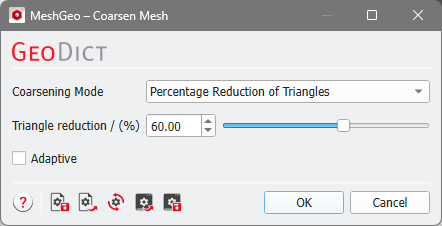
Coarsening Mode
MeshGeo provides three modes to coarsen triangulations, based on the stopping criteria for the coarsening algorithm: by Percentage Reduction of Triangles, by Edge Length, and by Target Number of Triangles.
The coarsening algorithm reduces the number of triangles in the currently loaded mesh by combining short edges to longer edges. Depending on the choice of Coarsening Mode, the different stopping criteria and their corresponding input parameters are shown.
 Percentage Reduction of Triangles

Adaptive
Adaptive is only available for the modes Percentage Reduction of Triangles and Target Number of Triangles. With Adaptive, the coarsening algorithm minimizes the deviation of the coarsened surface from the original surface. The Adaptive algorithm generates a mesh with a non-uniform triangle size and can lead to triangles with bad aspect ratios.
When the Adaptive mode is disabled, the coarsening algorithm works based on the edge lengths in the mesh.
