Wetting Parameters
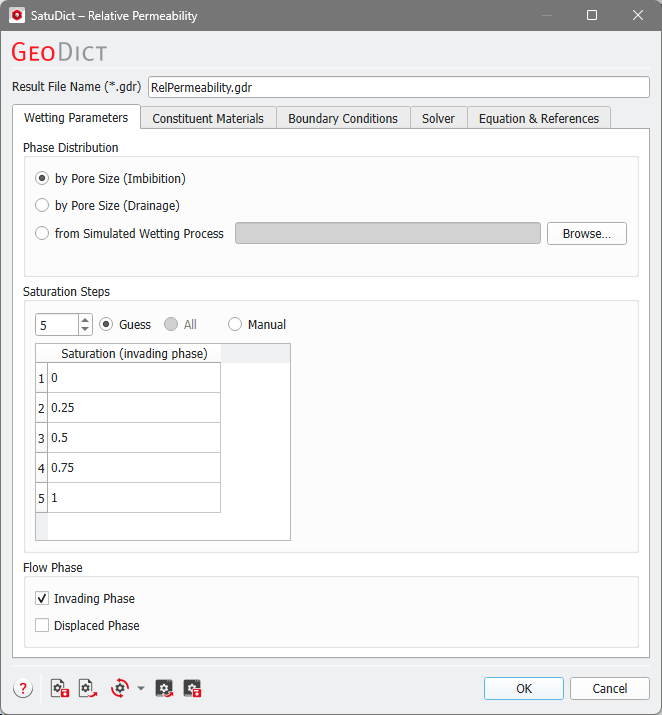
The Wetting Parameters tab is divided into three panels: Phase Distribution, Saturation Steps, and Flow Phase.
Phase Distribution
The calculation of phase distribution can be based on the pore size alone (by Pore Size (Imbibition) or by Pore Size (Drainage)), corresponding to a saturation experiment with Invading Fluid must be connected to a Reservoir unchecked. The same calculation as for the capillary pressure command is performed, but without a connectivity check. Only the pore sizes are considered. For by Pore Size (Imbibition) a contact angle of 0° for the invading fluid is assumed. When choosing by Pore Size (Drainage), the invading fluid contact angle is assumed to be 180°.
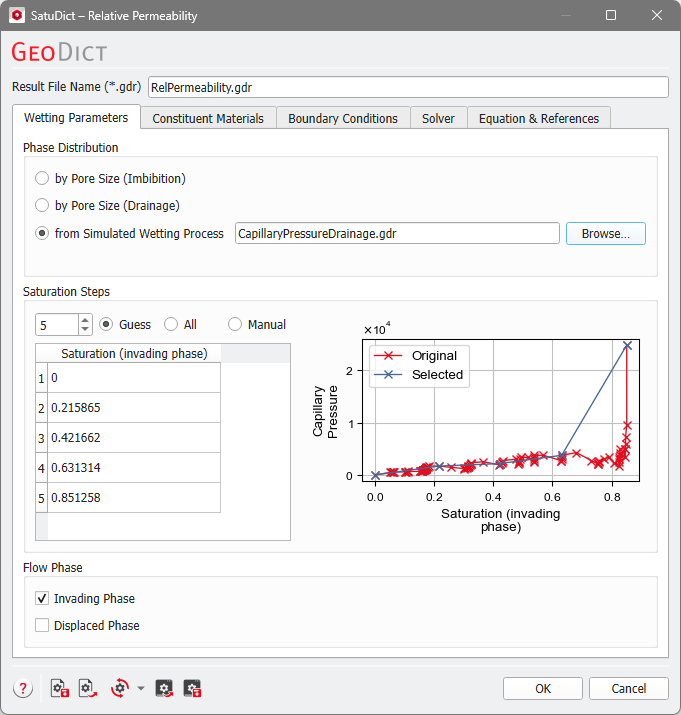
However, the phase or fluid distribution at different saturation points can be taken from a previously simulated imbibition or drainage process. Select from Simulated Wetting Process and click Browse... to choose a result file (GDR file) of a Capillary Pressure Curve computation on the same structure.
Saturation Steps
The permeability is calculated at different saturation steps of the invading fluid. In the Saturation (invading phase) table the chosen steps are shown or can be edited. There are three different modes to select the saturations:


Flow Phase
In the Flow Phase panel, choose the phase (Invading Phase and/or Displaced Phase) for which the Relative Permeability will be calculated.
- If you select Invading Phase, the displaced fluid will be treated as solid and flow only takes place in the invading fluid.
- If you select Displaced Phase, the invading fluid will be treated as solid and flow only takes place in the displaced fluid.
You can also select both phases, then, for each saturation step, two flow calculations will be made: one for each phase as described above.
